 Billing
& Support
Billing
& Support Multicraft
 Game
Panel
Game
Panel



How to Configure Race Settings on Your MX Bikes Server
The Race tab controls the complete event flow on your MX Bikes server, allowing administrators to customize practice sessions, qualifying rounds, race lengths, warmups, pauses, and event saves. These settings are essential for creating anything from casual quick races to full competitive championship structures. This guide explains every option available inside the Race section using the GGServers panel.
Step 1: Stop Your MX Bikes Server
Race session settings affect the server event structure and should be modified while the server is offline. Open your GGServers Control Panel, select your MX Bikes server, and click the Stop button. Wait until the server status changes to Offline.

Step 2: Access Server Settings
After the server goes offline, locate the left-side navigation menu and scroll to the Advanced section. Click Server Settings.

Step 3: Open the Race Tab
From the top tab menu, click Race. This section controls the flow and behavior of race sessions.
The Race page contains the following settings:
- Enable Open Practice:
- 0 (False): Normal event progression enabled.
- 1 (True): Ignores identified race settings and creates an open practice environment.
- Replace Qualify Race:
- 0 (False): Standard qualifying race remains active.
- 1 (True): Replaces qualifying races with qualifying practice and skips pre-qualifying.
- Enable Quick Race:
- 0 (False): Full event structure remains active.
- 1 (True): Skips sighting laps and most sessions except Warm-up and Race 2.
- Practice Session Length: Sets the practice session duration in minutes.
0skips the session. - Pre-qualify Session Length: Sets the pre-qualify session duration in minutes.
0skips the session. - Qualify Practice Session Length: Sets the qualifying practice duration in minutes.
0skips the session. - Warmup Session Length: Sets the warmup session duration in minutes.
0skips the session. - Enable Sighting Lap:
- 0 (False): Sighting lap disabled.
- 1 (True): Sighting lap enabled.
- Race Length Format:
- 0: Percentage of full race length plus extra laps.
- 1: Timed race plus extra lap.
- 2: Fixed lap count.
- Race Length Percentage: Sets race length percentage if percentage mode is selected.
- Race Length Period: Defines timed race length duration.
- Race Length Extra Laps: Sets additional laps for timed races.
- Race Length Laps: Defines total laps for lap-based races.
- Restart Delay: Determines automatic restart timing after events.
0disables automatic restart. - Race Over Length: Sets how long the completed race state remains active.
- Enable Event Pause:
- 0 (False): Event pausing disabled.
- 1 (True): Pauses and saves the event after a specified session.
- Event Pause Session: Selects the session where the server pauses and saves event progression.
- Resume Event Filename: Defines the saved event file loaded when resuming.
- Enable Event Save:
- 0 (False): Event auto-saving disabled.
- 1 (True): Event automatically saves after a specified session.
- Event Save Session: Selects when automatic event saving occurs.
Combining these settings allows you to build everything from quick casual races to complex tournament structures with multiple sessions and persistent progress.
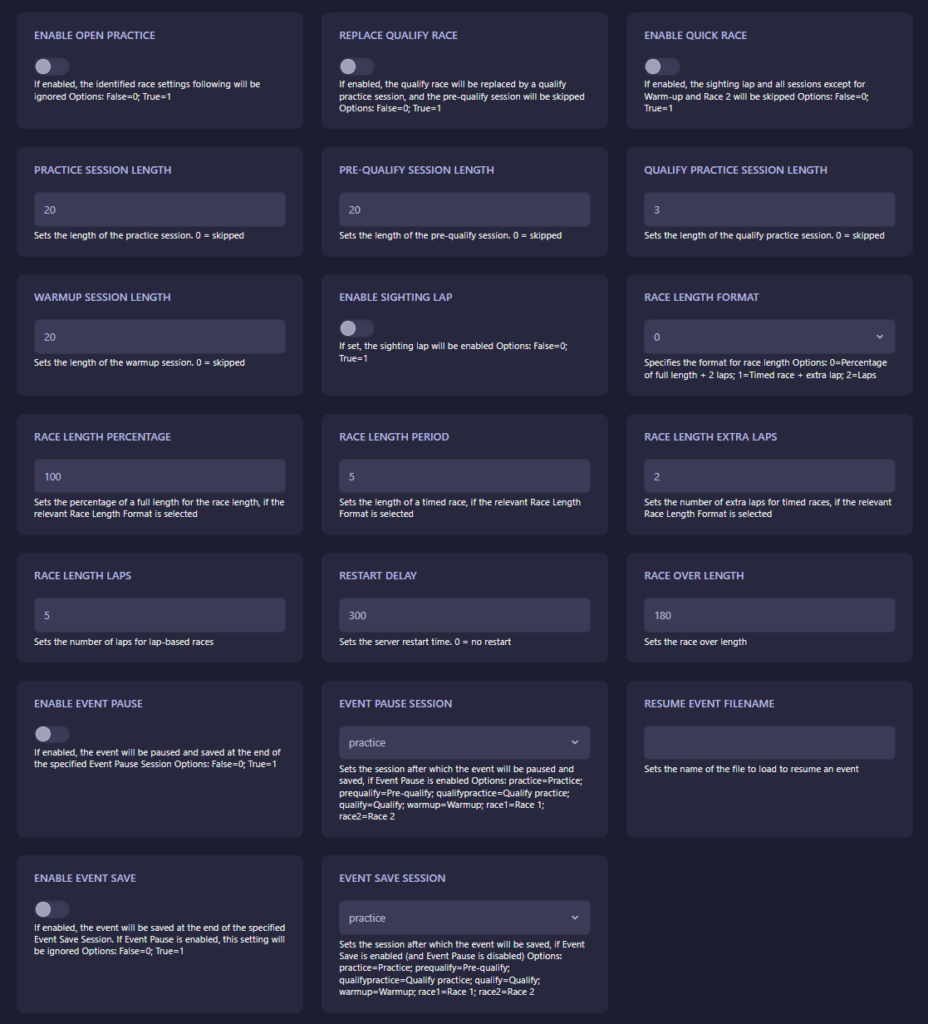
Step 4: Start Your Server
Return to the main server dashboard and click Start. Your MX Bikes server will now launch using the updated race session structure and event settings.
Competitive race structures and large multiplayer sessions require reliable performance and powerful infrastructure. Host your races with GGServers MX Bikes Server Hosting for low latency, optimized hardware, and smooth multiplayer racing.