 Billing
& Support
Billing
& Support Multicraft
 Game
Panel
Game
Panel



How to Configure Event Settings on Your MX Bikes Server
Event settings control the identity, progression flow, and bike restrictions for your MX Bikes server. Whether you are hosting casual races, organized tournaments, or dedicated league sessions, the Event tab allows you to customize how players experience your server. This guide explains every option available inside the Event section using the GGServers panel.
Step 1: Stop Your MX Bikes Server
Server event configurations require a server restart to fully initialize and synchronize correctly. Open your GGServers Control Panel, select your MX Bikes server, and click the Stop button. Wait until the server status changes to Offline.

Step 2: Access Server Settings
After the server has gone offline, locate the navigation panel on the left side of the dashboard. Under the Advanced section, click Server Settings.

Step 3: Open the Event Tab
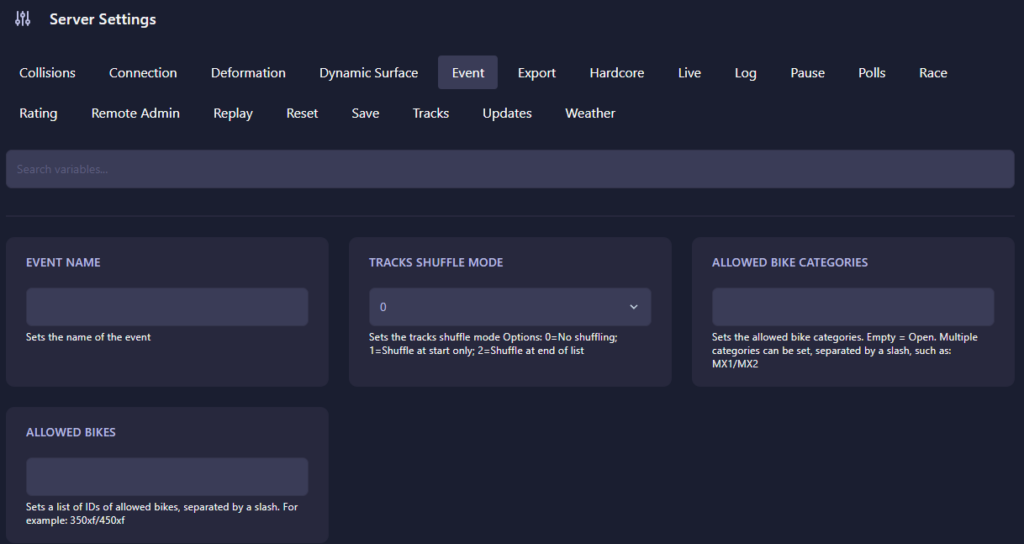
Locate the top configuration menu and click on Event. This section contains server identity options, track rotation settings, and bike restrictions.
The Event page contains the following variables:
- Event Name: Sets the custom name displayed for your server event. This can be used for tournaments, race nights, championships, or community sessions.
- Tracks Shuffle Mode: Determines how tracks rotate during gameplay.
- 0: No shuffling. Tracks remain in their configured order.
- 1: Shuffle at start only. The server randomizes the order once when the event begins.
- 2: Shuffle at end of list. Tracks rotate randomly after the playlist completes.
- Allowed Bike Categories: Restricts riders to specific bike classes. Leave the field empty for unrestricted access. Multiple categories can be added using slashes such as
MX1/MX2. - Allowed Bikes: Restricts access to specific bike IDs. Multiple bike IDs can be added separated with slashes, for example
350xf/450xf.
Combining bike restrictions with custom event names helps create organized race environments and prevents players from joining with unintended classes or setups.
Step 4: Start Your Server
Return to the primary dashboard and click Start. Your MX Bikes server will now load with the updated event settings and restrictions.
Competitive race nights and organized community events perform best on reliable infrastructure. Launch your races with GGServers MX Bikes Server Hosting for low latency, high performance, and smooth multiplayer experiences.