 Billing
& Support
Billing
& Support Multicraft
 Game
Panel
Game
Panel



How to Configure Hardcore Settings on Your MX Bikes Server
The Hardcore tab allows administrators to create a more competitive and realistic MX Bikes experience by enforcing gameplay restrictions and anti-cheat protections. These settings can limit assists, force specific camera views, restrict tire usage, and automatically punish certain modified game behaviors. This guide explains every option available inside the Hardcore section using the GGServers panel.
Step 1: Stop Your MX Bikes Server
Gameplay rule modifications should be applied while the server is offline to ensure they initialize correctly. Open your GGServers Control Panel, select your MX Bikes server, and click the Stop button. Wait until the server status changes to Offline.

Step 2: Access Server Settings
After the server is offline, locate the left-side navigation panel and scroll to the Advanced section. Click on Server Settings.

Step 3: Open the Hardcore Tab
From the top settings menu, click on Hardcore. This section contains realism settings, gameplay limitations, and anti-cheat controls.
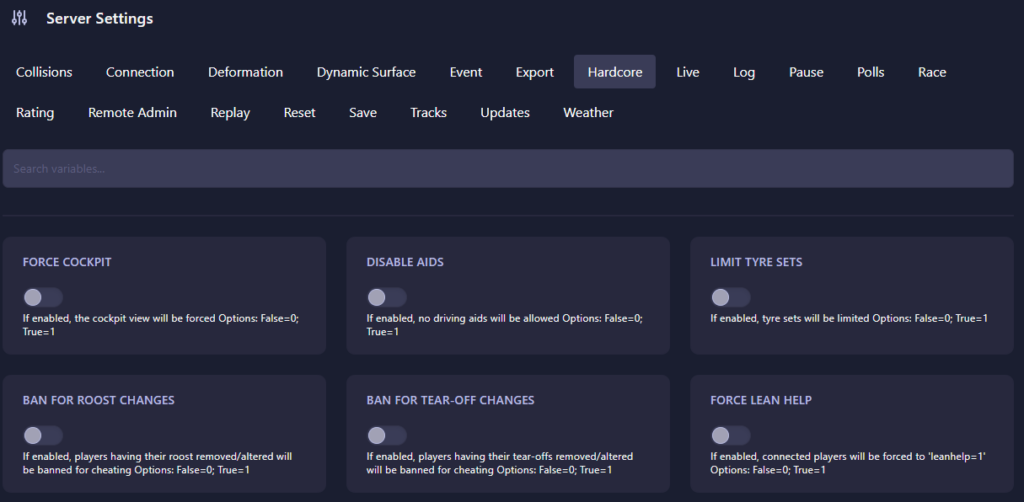
The Hardcore page includes the following settings:
- Force Cockpit: Forces all connected players to use cockpit view only.
- 0 (False): Players may freely change camera perspectives.
- 1 (True): Cockpit view becomes mandatory.
- Disable Aids: Prevents players from using riding assistance features.
- 0 (False): Riding aids remain available.
- 1 (True): All driving aids become disabled.
- Limit Tyre Sets: Restricts available tire usage during events.
- 0 (False): Unlimited tire usage.
- 1 (True): Tire sets become limited.
- Ban For Roost Changes: Automatically bans players using altered or removed roost effects that may provide unfair gameplay advantages.
- 0 (False): Roost modification checks disabled.
- 1 (True): Automatic bans enabled.
- Ban For Tear-off Changes: Automatically bans players using modified tear-off settings.
- 0 (False): Tear-off modification checks disabled.
- 1 (True): Automatic bans enabled.
- Force Lean Help: Forces all players to use the lean help feature.
- 0 (False): Players can choose their preferred setting.
- 1 (True): Lean help is forced to
leanhelp=1.
Combining these settings allows server owners to create highly competitive environments or realistic simulation-style events while helping maintain fairness across the entire player base.
Step 4: Start Your Server
Return to the server dashboard and click Start. Your MX Bikes server will now launch with the updated hardcore rules and restrictions.
Competitive race environments require reliable infrastructure and consistent server performance. Power your events using GGServers MX Bikes Server Hosting for low latency, optimized hardware, and smooth multiplayer racing.