 Billing
& Support
Billing
& Support Multicraft
 Game
Panel
Game
Panel



How to Configure Dynamic Surface Settings on Your MX Bikes Server
Track evolution can dramatically change race conditions during an MX Bikes session. The Dynamic Surface tab allows you to control whether track terrain changes during gameplay and whether those surface modifications persist across events. This system directly affects realism, riding strategy, and long-term server progression. This guide explains each setting available within the Dynamic Surface section using the GGServers panel.
Step 1: Stop Your MX Bikes Server
Before modifying important server environment settings, shut down the server instance to ensure changes save correctly. Open your GGServers Control Panel, select your MX Bikes server, and click the Stop button. Wait until the server status changes to Offline.

Step 2: Access Server Settings
Once the server status reads offline, locate the left-side navigation panel and scroll to the Advanced section. Click Server Settings to access all configurable gameplay and environment options.

Step 3: Open the Dynamic Surface Tab
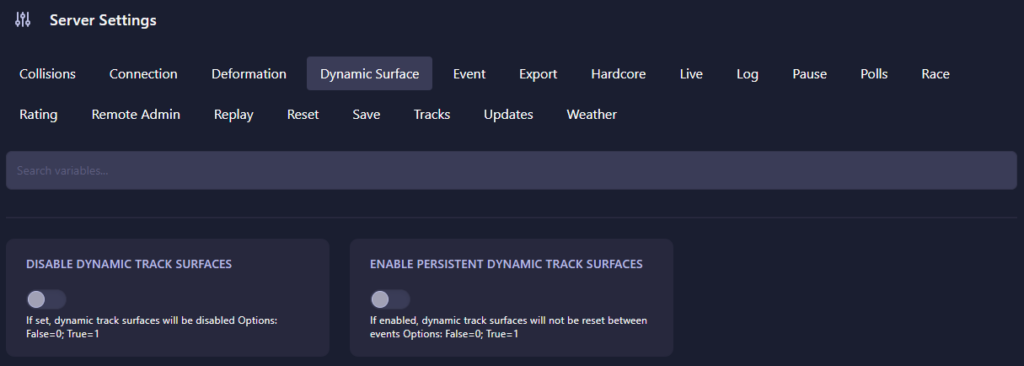
From the top tab navigation menu, click on Dynamic Surface. This section contains the settings that determine whether track conditions change dynamically and whether those modifications remain between events.
The Dynamic Surface page includes the following settings:
- Disable Dynamic Track Surfaces: Controls whether track deformation and surface changes occur during gameplay. Setting the value to 0 (False) enables dynamic terrain changes as riders create ruts and alter track conditions. Setting the value to 1 (True) disables track evolution entirely and keeps the terrain static.
- Enable Persistent Dynamic Track Surfaces: Determines whether changes made to the track remain after an event ends. Setting the value to 0 (False) resets the terrain after every session. Setting the value to 1 (True) preserves track wear and deformation across future races.
Persistent dynamic surfaces are useful for leagues and long-term communities that want progressively evolving tracks. Disabling persistence ensures every race begins with fresh conditions.
Step 4: Start Your Server
Return to the main dashboard and click Start. Your MX Bikes server will now initialize using the updated terrain simulation settings.
Realistic terrain evolution and large multiplayer sessions require reliable infrastructure. Keep your racing environment smooth using GGServers MX Bikes Server Hosting with optimized performance and low-latency connectivity.