 Billing
& Support
Billing
& Support Multicraft
 Game
Panel
Game
Panel



How to Configure Terrain Deformation Settings on Your MX Bikes Server
Terrain deformation is one of the most realistic features in MX Bikes, allowing tires to dig into the dirt and dynamically carve out ruts, bumps, and lines as the race progresses. Managing this behavior is essential, as heavy deformation completely changes the track physics and handling over time. The Deformation tab on your panel lets you control how aggressively the terrain changes and whether it automatically clears between sessions. This guide will show you how to configure these options using the GGServers panel.
Step 1: Stop Your MX Bikes Server
Because track deformation directly alters the physical terrain geometry loaded by the server instance, you must stop the server before editing these parameters. Access your GGServers Control Panel, select your MX Bikes instance, and click the Stop button. Wait for the status indicator to confirm the server is “Offline.”

Step 2: Navigate to Server Settings
Once the server is offline, look at the menu navigation menu on the left side of your dashboard. Locate the Advanced section and click on the Server Settings button.

Step 3: Open the Deformation Tab and Adjust Settings
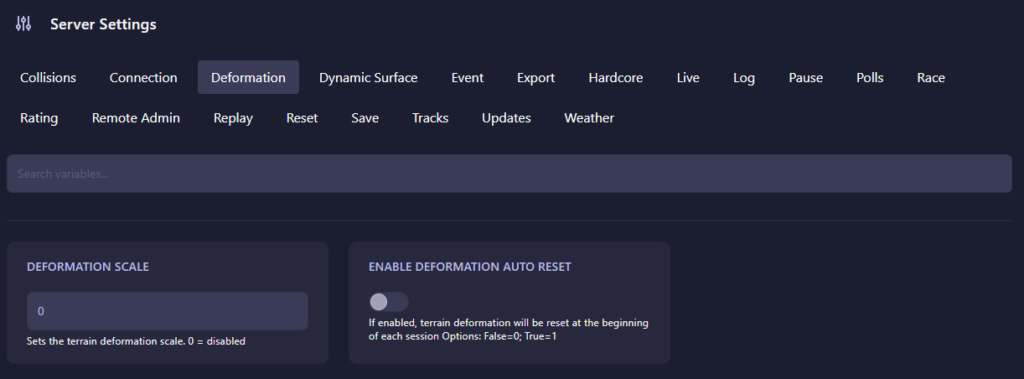
Click on the Deformation tab from the horizontal menu bar near the top. Configure the following fields to customize how your track erodes during a session:
- Deformation Scale: Dictates the rate and depth at which the dirt deforms under acceleration and cornering. Setting this to 0 completely disables deformation, keeping the track perfectly smooth. Higher numbers increase the rate at which deep ruts and rough lines develop.
- Enable Deformation Auto Reset: Determines if the track geometry should heal automatically. Set this to 1 (True) to automatically wipe away all ruts and reset the terrain to pristine condition at the start of every new session (Practice, Qualy, Race). Set it to 0 (False) to carry track deterioration continuously across sessions.
The GGServers user interface automatically saves your changes as soon as you finish updating either value.
Step 4: Start Your Server
Navigate back to the main console view and click Start. Your MX Bikes server will initialize using your updated terrain parameters, offering your racers anything from a perfectly static surface to a rapidly changing, realistic motocross track challenge!
Simulating dynamic terrain deformation and synchronized ruts across a full grid requires massive physics calculations. To keep your server’s tick rate stable while the track breaks down, power your community with GGServers MX Bikes Server Hosting. Our high-clock speed processors handle real-time terrain updates without dropping a single frame!