 Billing
& Support
Billing
& Support Multicraft
 Game
Panel
Game
Panel



How to Configure Connection and Server Settings on Your MX Bikes Server
Properly managing your server’s visibility, identity, and accessibility is crucial for building a successful racing community. The Connection tab in your MX Bikes server panel provides complete control over security, player capacity, entry text, network bandwidth, and access lists. This guide will walk you through each variable under the Connection menu using the GGServers panel.
Step 1: Stop Your MX Bikes Server
To successfully overwrite core server attributes like its name, maximum player slot count, or passwords, the server instance must be offline. Access your GGServers Control Panel, select your MX Bikes instance, and click the Stop button. Wait for the status indicator to show “Offline.”

Step 2: Navigate to Server Settings
With the server offline, find the navigation menu on the left side of your dashboard. Scroll to the Advanced category and click on the Server Settings button.

Step 3: Open the Connection Tab and Configure Settings
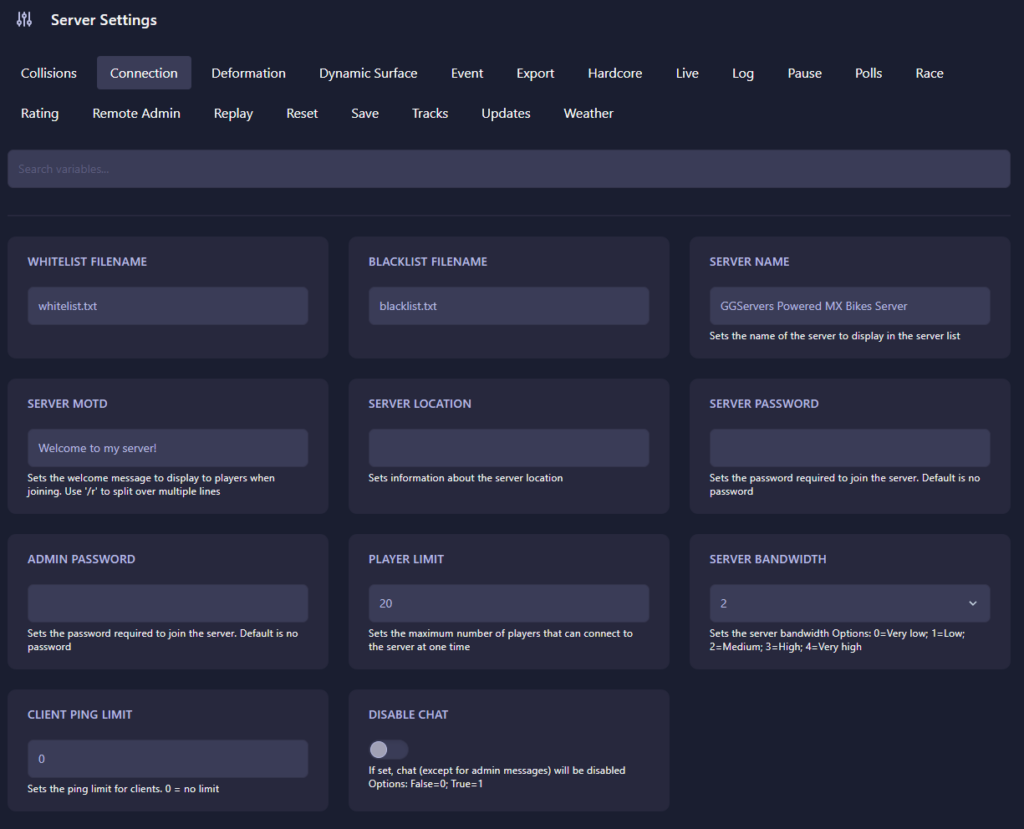
Click on the Connection tab from the top menu layout. Adjust the following fields to customize your server environment:
- Whitelist Filename / Blacklist Filename: Establishes the text files (default:
whitelist.txtandblacklist.txt) used to manage private access or restricted player blocks. - Server Name: Input the public title for your server as you want it to appear within the in-game multiplayer server browser listing.
- Server MOTD: Sets the custom greeting Message of the Day shown to riders upon connection. You can use
/rto break text across multiple lines. - Server Location: Allows you to specify the geographical region info to show players their relative proximity.
- Server Password: Enter a password here to make your server private. Leave it completely blank if you want an open public lobby.
- Admin Password: Defines the password used to authenticate as a server administrator via the in-game chat commands.
- Player Limit: Sets the maximum slot threshold of concurrent racers allowed on the track at one time.
- Server Bandwidth: Adjusts the allocation performance limits for simulation packet delivery. Options scale from 0 (Very low) up to 4 (Very high). Medium (2) is default.
- Client Ping Limit: Establishes the maximum allowed latency for connecting riders. Enter 0 to disable the cap or set a specific limit (e.g., 250) to kick high-lag connections automatically.
- Disable Chat: Toggles public text interactions. Set to 0 (False) to leave text chat active or 1 (True) to restrict chat solely to administrative broadcasts.
The GGServers automation layout updates and applies your values automatically as you finalize edits inside each input field.
Step 4: Start Your Server
Return to the main dashboard module and click Start. Your MX Bikes server will instantly initialize with your revised network rules, branding text, and capacity restrictions live on the server directory!
Synchronizing dense multi-rider fields requires robust server architecture and immense network capacity. To keep your races smooth and latency crisp, power your track network with GGServers MX Bikes Server Hosting. Our premium network nodes are optimized to handle full grids without breaking a sweat!