 Billing
& Support
Billing
& Support Multicraft
 Game
Panel
Game
Panel



How to Configure Zombie Difficulty (Speed) on Your HumanitZ Server
Speed is one of the most lethal factors in HumanitZ. The Zombie Difficulty (Speed) setting dictates how fast the undead move when they spot a survivor. While slower zombies allow for a more tactical, classic survival feel, higher speed settings can turn every encounter into a frantic, high-stakes chase. This guide will show you how to adjust the movement speed of the horde using the GGServers panel.
Step 1: Stop Your HumanitZ Server
To ensure that all existing and future zombie spawns adopt the new movement physics, the server must be restarted. Access your GGServers Control Panel, select your HumanitZ instance, and click the Stop button. Wait for the status to show as “Offline” before proceeding.

Step 2: Access Server Settings
Once the server is fully stopped, navigate to the sidebar menu on the left side of the panel and click on Server Settings. This area contains the management tools for your server’s difficulty and behavior.

Step 3: Open the General Settings Tab
Inside the Server Settings menu, click on the General Settings tab. This is where you will find the numerical toggles for AI difficulty.

Step 4: Update Zombie Difficulty (Speed)
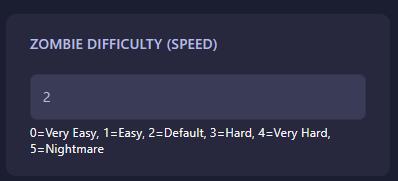
Locate the field labeled Zombie Difficulty (Speed). Use the following numerical values to set how fast the zombies will move on your server:
- 0: Very Easy (Slow, shambling movement).
- 1: Easy
- 2: Default (Balanced movement speed).
- 3: Hard
- 4: Very Hard
- 5: Nightmare (Extremely fast, aggressive sprinters).
The GGServers panel automatically saves your changes as soon as you finish editing the field.
Step 5: Start Your Server
Return to the main dashboard and click Start. Your HumanitZ server will now boot with the new speed settings active. Advise your survivors to increase their stamina if they’re facing Nightmare-speed zombies!
Outrunning a fast horde requires zero lag and peak server performance. To ensure your combat and movement remain perfectly fluid, host your world with GGServers HumanitZ Server Hosting. Our optimized network and hardware ensure the undead are always right on your heels!