 Billing
& Support
Billing
& Support Multicraft
 Game
Panel
Game
Panel



How to Change the Zombie Respawn Timer on Your HumanitZ Server
Clearing an area of the undead provides a temporary sense of security, but in HumanitZ, the horde always returns. The Zombie Respawn Timer controls the interval at which the world replenishes its zombie population after they have been eliminated. Whether you want cleared zones to remain safe for a long time or you prefer a relentless onslaught where enemies return quickly, this guide will show you how to set the timer using the GGServers panel.
Step 1: Stop Your HumanitZ Server
Because the respawn system is tied to the server’s world management and performance cycles, you must stop the server before making changes. Access your GGServers Control Panel, select your instance, and click the Stop button. Wait for the status to show as “Offline.”

Step 2: Access Server Settings
Once the server is offline, navigate to the sidebar menu on the left side of the panel and click on Server Settings. This area contains all the configuration tools for your HumanitZ dedicated server.

Step 3: Open the General Settings Tab
In the Server Settings menu, click on the General Settings tab. This section manages the core gameplay variables, including AI behavior and world replenishment rules.

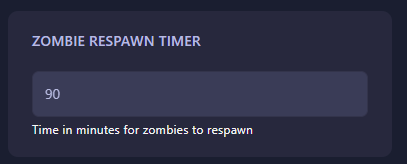
Step 4: Set the Zombie Respawn Timer
Locate the field labeled Zombie Respawn Timer. Enter the time in minutes that should pass before the server attempts to respawn zombies in an area that has been cleared. For a more intense experience, use a lower number; for a slower-paced survival world, increase the value. The GGServers panel automatically saves your changes as soon as you update the field.
Step 5: Start Your Server
Return to the main dashboard and click Start. Your HumanitZ server will now boot with the updated respawn timing. Your world will now maintain its zombie population according to the pace you’ve set!
Managing the constant respawn of AI entities requires a server with a stable processor and fast memory. To ensure your world stays populated without any lag spikes, host with GGServers HumanitZ Server Hosting. Our optimized hardware is built to handle dynamic AI spawning with maximum efficiency!