 Billing
& Support
Billing
& Support Multicraft
 Game
Panel
Game
Panel



How to Configure Human NPC Difficulty on Your HumanitZ Server
Zombies aren’t the only threat in HumanitZ; hostile human NPCs can be even more dangerous due to their use of firearms and tactical movement. The Human Difficulty setting controls the overall challenge posed by these AI survivors, affecting their accuracy, health, and combat effectiveness. This guide will show you how to adjust the difficulty of human enemies using the GGServers panel.
Step 1: Stop Your HumanitZ Server
To ensure that all AI entities in the world are updated with the new difficulty parameters, you must restart the server. Access your GGServers Control Panel, select your instance, and click the Stop button. Wait for the status to confirm as “Offline.”

Step 2: Access Server Settings
Once the server is fully stopped, navigate to the sidebar menu on the left side of the panel and click on Server Settings. This section allows you to manage the core rules of your apocalypse.

Step 3: Open the General Settings Tab
In the Server Settings menu, click on the General Settings tab. This is where the primary gameplay modifiers for both zombies and human NPCs are located.

Step 4: Update Human Difficulty
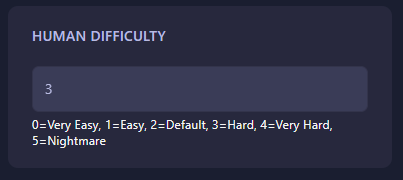
Locate the field labeled Human Difficulty. Enter the numerical value that represents the level of challenge you want your players to face when encountering other survivors:
- 0: Very Easy (NPCs have low health and poor aim).
- 1: Easy
- 2: Default (The balanced HumanitZ experience).
- 3: Hard
- 4: Very Hard
- 5: Nightmare (NPCs are highly lethal, accurate, and tough).
The GGServers panel saves your changes automatically once you have entered the desired value.
Step 5: Start Your Server
Return to the main dashboard and click Start. Your HumanitZ server will now boot with the new NPC rules active. Warn your players: at higher settings, human enemies can end a run in seconds!
Engaging in firefights with AI requires a server that can keep up with the action. To ensure your combat is smooth and fair, host your world with GGServers HumanitZ Server Hosting. Our high-performance hardware ensures that every bullet registers exactly where it should!