 Billing
& Support
Billing
& Support Multicraft
 Game
Panel
Game
Panel



How to Configure Zombie Difficulty (Health) on Your HumanitZ Server
The undead are the primary threat in HumanitZ, and their durability defines the pace of combat. The Zombie Difficulty (Health) setting allows you to scale the hit points of the zombie population. Whether you want a more arcade-like experience where zombies go down quickly or a “Nightmare” scenario where every encounter is a bullet-sink, the GGServers panel provides easy-to-use presets. This guide will show you how to adjust zombie toughness.
Step 1: Stop Your HumanitZ Server
Modifying enemy health values requires the server to refresh its entity logic. Access your GGServers Control Panel, select your HumanitZ instance, and click the Stop button. Wait for the status to show as “Offline” before moving to the next step.

Step 2: Access Server Settings
Once the server is offline, locate the sidebar menu on the left side of the panel. Click on the Server Settings button to open the configuration dashboard for your dedicated server.

Step 3: Open the General Settings Tab
In the Server Settings menu, click on the General Settings tab. This section contains the primary modifiers for AI behavior and world difficulty.

Step 4: Update Zombie Difficulty
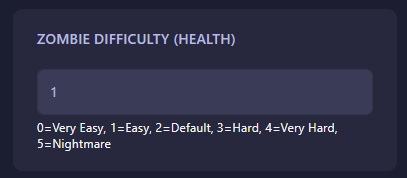
Locate the field labeled Zombie Difficulty (Health). This setting uses a numerical scale to determine how much health the zombies have. Enter the value that matches your desired difficulty level:
- 0: Very Easy
- 1: Easy
- 2: Default (Standard HumanitZ experience)
- 3: Hard
- 4: Very Hard
- 5: Nightmare
The GGServers panel saves your changes automatically once you have entered the numerical value.
Step 5: Start Your Server
Return to the main dashboard and click Start. Your HumanitZ server will now boot with the new zombie health rules in effect. Make sure your survivors are stocked up on ammo if you’ve set it to Nightmare!
Facing a Nightmare-level horde requires a server that won’t stutter under pressure. To ensure your combat remains fluid and responsive, host your world with GGServers HumanitZ Server Hosting. Our high-performance hardware ensures that even the largest hordes are handled with ease!