 Billing
& Support
Billing
& Support Multicraft
 Game
Panel
Game
Panel



How to Configure Weapon Durability on Your HumanitZ Server
Weapon maintenance is a core survival pillar in HumanitZ. Depending on your desired difficulty, you can decide whether high-tier firearms and tools should break permanently upon reaching 0% durability or if only improvised gear should be subject to breakage. This setting allows you to balance realism with player progression. This guide will show you how to adjust the Weapon Durability rules on the GGServers panel.
Step 1: Stop Your HumanitZ Server
Because weapon durability logic is baked into the item initialization when the server starts, you must stop the server to apply changes to these mechanics. Access your GGServers Control Panel, select your instance, and click the Stop button. Wait for the status to confirm as “Offline.”

Step 2: Access Server Settings
With the server offline, navigate to the sidebar menu on the left side of the panel. Click on the Server Settings button to open the configuration dashboard for your HumanitZ dedicated server.

Step 4: Open the General Settings Tab
In the Server Settings menu, click on the General Settings tab. This section contains the primary gameplay toggles, including how the game handles item degradation and tool breakage.

Step 4: Configure Weapon Durability
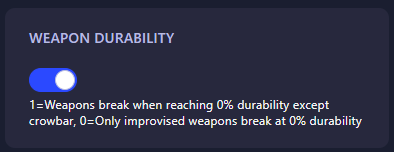
Locate the field labeled Weapon Durability. Enter the numerical value that represents the level of challenge you want for your survivors:
- 0: Only improvised weapons break at 0% durability (Standard weapons remain usable but may lose effectiveness).
- 1: All weapons break when reaching 0% durability (except the crowbar).
The GGServers panel automatically saves your changes as soon as you update the field.
Step 5: Start Your Server
Return to the main dashboard and click Start. Your HumanitZ server will now boot with the new durability rules in effect. Make sure your players are ready to keep their gear repaired!
Keeping your arsenal in top shape is vital for survival. To ensure your server performance is just as reliable as your gear, host with GGServers HumanitZ Server Hosting. Our high-performance NVMe storage ensures your world and item data are handled with maximum speed!