 Billing
& Support
Billing
& Support Multicraft
 Game
Panel
Game
Panel



How to Enable or Disable PvP on Your HumanitZ Server
In HumanitZ, you can choose whether the primary threat is just the undead or if players can also combat one another. Toggling the PvP setting allows you to switch between a purely cooperative (PvE) experience and a more dangerous Player vs. Player environment. This is essential for defining the social dynamic of your community. This guide will show you how to toggle this setting on the GGServers panel.
Step 1: Stop Your HumanitZ Server
Changing the combat rules requires the server to re-initialize its damage protocols. Access your GGServers Control Panel, select your HumanitZ instance, and click the Stop button. Wait for the status to show as “Offline” before moving to the next step.

Step 2: Access Server Settings
Once the server is offline, navigate to the sidebar menu on the left side of the panel. Click on the Server Settings button to open the configuration dashboard for your HumanitZ dedicated server.

Step 3: Open the General Settings Tab
In the Server Settings menu, click on the General Settings tab. This section contains the primary toggles for world rules, including player interaction and combat mode.

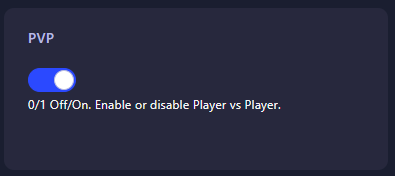
Step 4: Configure the PvP Setting
Locate the field labeled PvP. Enter the numerical value that represents the mode you wish to use for your server:
- 0: PvP Off (Players cannot damage each other; PvE Mode).
- 1: PvP On (Players can damage and kill each other).
The GGServers panel saves your changes automatically once you have entered the value.
Step 5: Start Your Server
Go back to the main dashboard and click Start. Your HumanitZ server will now boot with the selected combat rules active. Whether you’re building a peaceful haven or a ruthless warzone, your server is now ready!
Whether you’re fighting zombies or each other, performance is non-negotiable. To ensure your combat is smooth and responsive, host your world with GGServers HumanitZ Server Hosting. Our high-performance network ensures every shot and swing counts!