 Billing
& Support
Billing
& Support Multicraft
 Game
Panel
Game
Panel



How to Change the Pickup Respawn Timer on Your HumanitZ Server
Pickups in HumanitZ include essential loose items found throughout the world, such as wood, stones, and other natural resources that aren’t necessarily inside containers. Managing the Pickup Respawn Timer is crucial for ensuring your survivors always have access to base-building materials or, conversely, for creating a world where resources are scarce. This guide will show you how to adjust this timer using the GGServers panel.
Step 1: Stop Your HumanitZ Server
To ensure the server correctly updates the respawn cycle for world objects, a full restart is required. Access your GGServers Control Panel, select your HumanitZ instance, and click the Stop button. Wait for the status to show as “Offline.”

Step 2: Access Server Settings
With the server stopped, go to the left-hand sidebar menu and click on Server Settings. This area handles all the technical parameters for how your world functions.

Step 3: Open the General Settings Tab
Inside the Server Settings menu, click on the General Settings tab. This is where the core logic for resource replenishment is located.

Step 4: Update the Pickup Respawn Timer
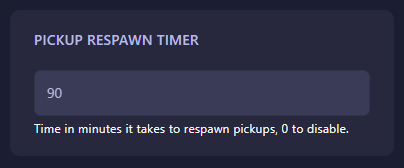
Locate the field labeled Pickup Respawn Timer. Enter the time in minutes that you want the server to wait before respawning world pickups. If you want to prevent resources like loose wood or stones from ever reappearing, set this value to 0. The GGServers panel saves your changes automatically.
Step 5: Start Your Server
Return to the main dashboard and click Start. Your HumanitZ server will now boot with the new timing for resource pickups. Your survivors can now continue gathering materials at the rate you’ve set!
Efficient resource management is the foundation of any great base. To ensure your server handles world item tracking without lag, host your adventure with GGServers HumanitZ Server Hosting. Our high-performance hardware is built to handle thousands of world objects with ease!