 Billing
& Support
Billing
& Support Multicraft
 Game
Panel
Game
Panel



How to Enable Permanent Death on Your HumanitZ Server
For players seeking the ultimate survival challenge, HumanitZ offers a Permanent Death (Permadeath) system. This feature changes the stakes of every encounter, as death can mean the end of a character’s journey or even the entire world’s progress. Whether you want to toggle this for individual survivors or create a hardcore server for everyone, the GGServers panel provides the tools to customize this intensity. This guide will walk you through the available Permadeath modes and how to apply them.
Step 1: Stop Your HumanitZ Server
Changing core gameplay mechanics like Permadeath requires a server restart to apply the new logic to the game world. Access your GGServers Control Panel, select your HumanitZ instance, and click the Stop button. Wait for the status to show as “Offline” before proceeding.

Step 2: Access Server Settings
Once the server is fully stopped, navigate to the sidebar menu on the left side of the panel. Click on the Server Settings button to open the configuration dashboard for your HumanitZ instance.

Step 3: Open the General Settings Tab
In the Server Settings menu, click on the General Settings tab. This section contains the primary toggles for game difficulty and hardcore survival features.

Step 4: Configure Permanent Death
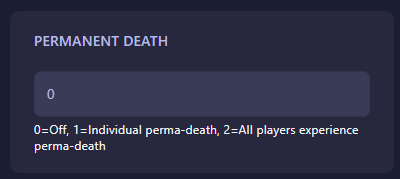
Locate the field labeled Permanent Death. This setting uses a numerical value to determine how death is handled on your server. Enter the value that fits your desired playstyle:
- 0: Off (Standard respawn rules apply).
- 1: Individual Perma-death (Only the dying player’s character is reset).
- 2: Global Perma-death (All players experience perma-death simultaneously).
The GGServers panel will automatically save your changes as soon as you update the field.
Step 5: Start Your Server
Return to the main dashboard and click Start. Your HumanitZ server will now boot with the selected hardcore rules active. Make sure your players are aware of these settings before they begin their journey!
Survival is a serious business on a hardcore server. To ensure your players never experience lag-related deaths, host your world with GGServers HumanitZ Server Hosting. Our low-latency network and modern hardware are the perfect foundation for a high-stakes Permadeath experience!