 Billing
& Support
Billing
& Support Multicraft
 Game
Panel
Game
Panel



How to Change the Loot Respawn Timer on Your HumanitZ Server
If you have loot respawning enabled on your HumanitZ server, the Loot Respawn Timer is the setting that controls how quickly those items return to the world. Adjusting this value allows you to find the perfect balance between a challenging survival experience and ensuring that new players always have access to essential supplies. This guide will show you how to set your preferred respawn interval using the GGServers panel.
Step 1: Stop Your HumanitZ Server
Because the respawn scheduler is initialized when the world loads, you must stop the server to apply changes to the timer. Access your GGServers Control Panel, select your instance, and click the Stop button. Wait for the status to show as “Offline” before proceeding.

Step 2: Access Server Settings
Once the server is fully stopped, navigate to the sidebar menu on the left side of the panel. Click on the Server Settings button to open the configuration dashboard for your HumanitZ dedicated server.

Step 3: Open the General Settings Tab
In the Server Settings menu, click on the General Settings tab. This section contains the primary switches for world mechanics and resource management.

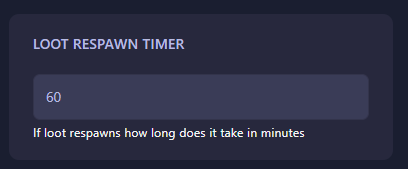
Step 4: Set the Loot Respawn Timer
Locate the field labeled Loot Respawn Timer. Enter the amount of time, in minutes, that must pass before loot is replenished in the world. For example, entering “60” will cause loot to respawn every hour. The GGServers panel automatically saves your changes as soon as you finish editing the field.
Step 5: Start Your Server
Return to the main dashboard and click Start. Your HumanitZ server will now boot with the new respawn interval active. Your world will now replenish its resources at the exact pace you’ve defined!
A consistent flow of resources keeps the action going. To ensure your server handles world events and loot tracking without a hitch, host your world with GGServers HumanitZ Server Hosting. Our high-performance hardware is optimized for seamless survival gameplay!