 Billing
& Support
Billing
& Support Multicraft
 Game
Panel
Game
Panel



How to Configure Loot Respawn on Your HumanitZ Server
In the scavenging-heavy world of HumanitZ, managing the economy of resources is a key part of balancing difficulty. By adjusting the Loot Respawn setting, you can decide if the world is a finite resource where every scavenged bullet is gone forever, or a replenishing environment that supports long-term community play. This guide will show you how to toggle loot respawning using the GGServers panel.
Step 1: Stop Your HumanitZ Server
Loot generation and respawn timers are handled during the server’s world management cycle. To change these rules, you must first stop the server to ensure the new configuration is applied to the world state. Access your GGServers Control Panel, select your HumanitZ instance, and click the Stop button. Wait for the status to show as “Offline.”

Step 2: Access Server Settings
Once the server is fully stopped, navigate to the sidebar menu on the left side of the panel. Click on the Server Settings button to open the management dashboard for your HumanitZ dedicated server.

Step 3: Open the General Settings Tab
In the Server Settings menu, click on the General Settings tab. This section contains the primary switches for world mechanics, including the logic for container and ground loot.

Step 4: Configure the “Loot Respawn” Setting
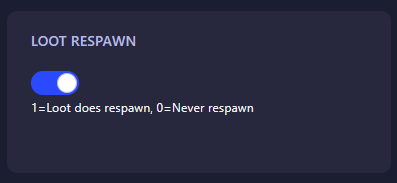
Locate the field labeled Loot Respawn. Enter the numerical value that represents the gameplay experience you want to provide for your players:
- 0: Never respawn (Once a container is looted, it remains empty forever).
- 1: Loot does respawn (Items will refill in empty containers based on your server’s respawn timer).
The GGServers panel automatically saves your changes as soon as you finish editing the field. Note that for loot to respawn, containers must typically be completely emptied by players first.
Step 5: Start Your Server
Return to the main dashboard and click Start. Your HumanitZ server will now boot with the updated loot rules active. Whether you’re running a hardcore survival world or a long-term community server, your resources are now set exactly how you need them!
A thriving world needs a powerful server to track thousands of loot items across the map. To ensure your scavenging remains smooth and lag-free, host your world with GGServers HumanitZ Server Hosting. Our premium hardware and NVMe storage are designed for the ultimate survival experience!