 Billing
& Support
Billing
& Support Multicraft
 Game
Panel
Game
Panel



How to Configure Loot Rarity on Your HumanitZ Server
Finding the right balance of item availability is key to defining your server’s difficulty. The Loot Rarity setting controls the overall frequency and quality of items found in the world. Whether you want a hardcore experience where every bullet is a treasure or a more casual playthrough with plenty of supplies, the GGServers panel allows you to easily switch between these presets. This guide will show you how to adjust loot density for your survivors.
Step 1: Stop Your HumanitZ Server
Loot tables are generated when the world initializes. To change how much loot spawns in containers and buildings, you must first stop the server. Access your GGServers Control Panel, select your instance, and click the Stop button. Wait for the status to show as “Offline.”

Step 2: Access Server Settings
Once the server is stopped, navigate to the sidebar menu on the left side of the panel and click on Server Settings. This area contains all the configuration options for your HumanitZ world.

Step 3: Open the General Settings Tab
In the Server Settings menu, click on the General Settings tab. This is where you can find the primary difficulty modifiers for your server.

Step 4: Update the Loot Rarity
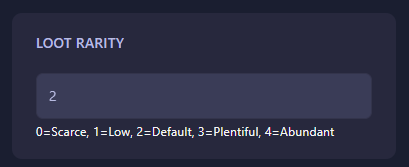
Locate the field labeled Loot Rarity. This setting uses a numerical scale to determine how much gear spawns in the world. Enter the value that fits your desired playstyle:
- 0: Scarce (Hardcore survival, very little loot).
- 1: Low (Reduced loot for a tougher challenge).
- 2: Default (The standard HumanitZ experience).
- 3: Plentiful (More items for faster progression).
- 4: Abundant (Maximum loot for a casual or sandbox experience).
The GGServers panel will automatically save your changes once you update the field.
Step 5: Start Your Server
Return to the main dashboard and click Start. Your HumanitZ server will now boot with the selected loot rarity active. Note that this change may be more noticeable in areas that haven’t been visited yet or after a loot respawn cycle!
Scavenging is a core part of the apocalypse. To ensure your survivors have the most responsive experience while looting, host your world with GGServers HumanitZ Server Hosting. Our NVMe SSDs provide the fastest data access speeds for a lag-free world!