 Billing
& Support
Billing
& Support Multicraft
 Game
Panel
Game
Panel



How to Change Building Health on Your HumanitZ Server
In the post-apocalyptic world of HumanitZ, your base is your sanctuary. Depending on how aggressive you want the undead or rival players to be, you may want to strengthen or weaken player-placed structures. The Building Health setting acts as a multiplier for everything you build, from simple wooden walls to complex fortifications. This guide will show you how to adjust this multiplier using the GGServers panel.
Step 1: Stop Your HumanitZ Server
Since building health values are calculated when objects are initialized in the game world, you must stop the server to ensure the new multiplier is applied correctly. Access your GGServers Control Panel, select your HumanitZ instance, and click the Stop button. Wait for the status to show as “Offline” before proceeding.

Step 2: Access Server Settings
Once the server is fully stopped, locate the sidebar menu on the left side of the panel. Click on the Server Settings button to open the configuration dashboard for your HumanitZ dedicated server.

Step 3: Open the General Settings Tab
In the Server Settings menu, click on the General Settings tab. This section contains the primary gameplay multipliers, including those for building durability and resource management.

Step 4: Adjust the “Building Health” Multiplier
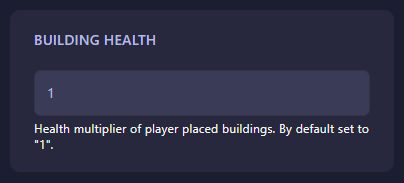
Locate the field labeled Building Health. By default, this is set to “1”. If you want to make buildings twice as strong, change it to “2”. To make them more fragile, you can use decimals like “0.5”. The GGServers panel automatically saves your changes as soon as you finish editing the field.
Step 5: Start Your Server
Return to the main dashboard and click Start. Your HumanitZ server will now boot with the new building health rules active. Your survivors can now rest easier (or worry more) inside their fortified homes!
A strong base needs a strong server. To ensure your fortifications and world data remain secure without lag, host your world with GGServers HumanitZ Server Hosting. Our high-performance NVMe storage ensures your world data is saved and loaded with maximum reliability!