 Billing
& Support
Billing
& Support Multicraft
 Game
Panel
Game
Panel



How to Enable or Disable Air Drops on Your HumanitZ Server
Air Drops are dynamic events in HumanitZ that provide survivors with high-tier loot, supplies, and equipment. While they offer a great reward, they also tend to draw players together, creating hotspots for conflict or cooperation. Depending on whether you want a loot-rich environment or a more desolate survival experience, you may wish to toggle these events. This guide will show you how to manage Air Drops using the GGServers panel.
Step 1: Stop Your HumanitZ Server
Because Air Drops are part of the server’s world event scheduler, you must stop the server to update the event configuration. Access your GGServers Control Panel, select your HumanitZ instance, and click the Stop button. Ensure the status reads “Offline” before moving to the next step.

Step 2: Access Server Settings
Once the server is offline, locate the sidebar menu on the left side of the panel. Click on the Server Settings button to open the configuration dashboard for your HumanitZ dedicated server.

Step 3: Open the General Settings Tab
In the Server Settings menu, click on the General Settings tab. This section contains the primary toggles for world events, including the spawning logic for supply drops.

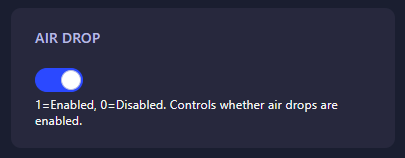
Step 4: Configure the “Air Drop” Setting
Locate the field labeled Air Drop. Enter the numerical value that corresponds to your preferred event frequency:
- 0: Disabled (No automated air drops will occur).
- 1: Enabled (Air drops will occur periodically throughout the world).
The GGServers panel automatically saves your changes as soon as you finish editing the field.
Step 5: Start Your Server
Go back to the main dashboard and click Start. Your HumanitZ server will now boot with the updated event rules. Keep an eye on the skies—or enjoy the peace and quiet of a scavenge-only world!
Dynamic events like Air Drops require a server that can handle sudden player movement and loot spawning without stuttering. To ensure your events run perfectly, host with GGServers HumanitZ Server Hosting. Our NVMe storage and high-speed network are built for the best survival performance!