 Billing
& Support
Billing
& Support Multicraft
 Game
Panel
Game
Panel



To achieve a clean slate, you will need to remove the main database file (game.db) from your server directories. Once this file is gone, the server automatically generates a brand-new world map upon its next boot. Follow the safe walkthrough below to complete the wipe.
How to Reset Your Conan Exiles Server Save Data
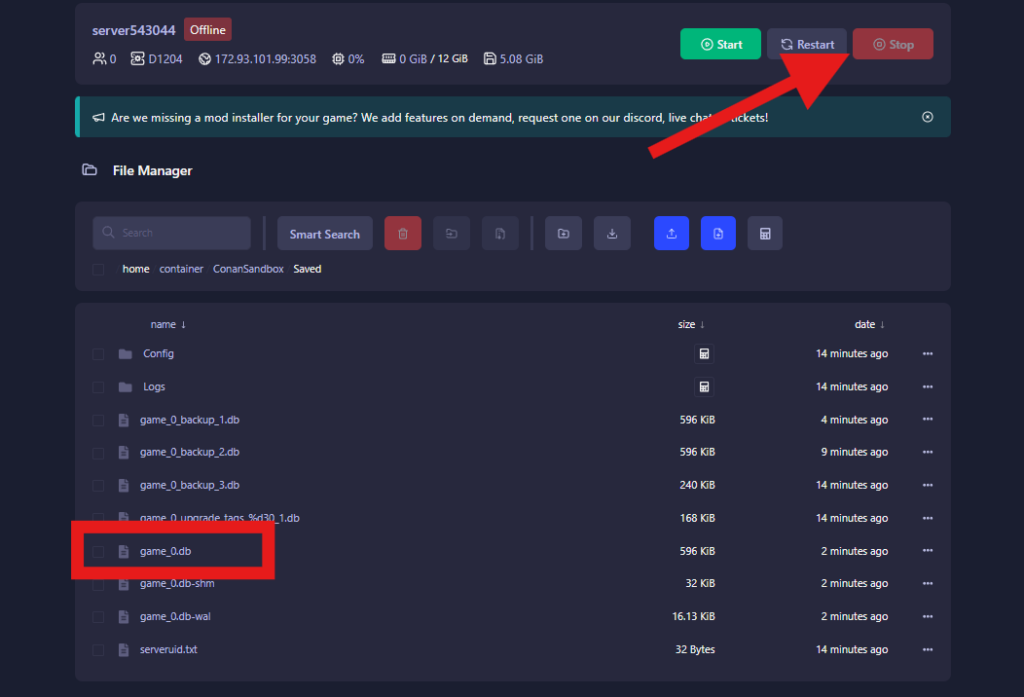
You can quickly delete your world database by using either your hosting control panel’s web-based file manager or an external FTP program like FileZilla.
- Stop the server: Log into your game server control panel and click the Stop button. (Never modify database files while the server is actively running).
- Locate the save directory: Click on “Files” tab and navigate through the folders to the following path:
/ConanSandbox/Saved/ - Remove the database: Look for the file named
game_X.db(where “X” corresponds to your active save slot or world number). Select this file and delete it. - Boot the server back up: Go back to your main panel and click Start. The server will launch, recognize the missing database, and generate a pristine new world for your players.
Running your Conan Exiles server on GGServers ensures you get reliable performance, low latency, and easy control panel management for testing new game updates. Use code KB30 at checkout to receive 30% off your first invoice when ordering your server.
If you need further help, our support team is available 24/7 at: https://ggservers.com/billing/submitticket.php