 Billing
& Support
Billing
& Support Multicraft
 Game
Panel
Game
Panel



You can change your combat settings directly within your hosting control panel by editing your server configuration files. Follow these steps to adjust your configuration safely:
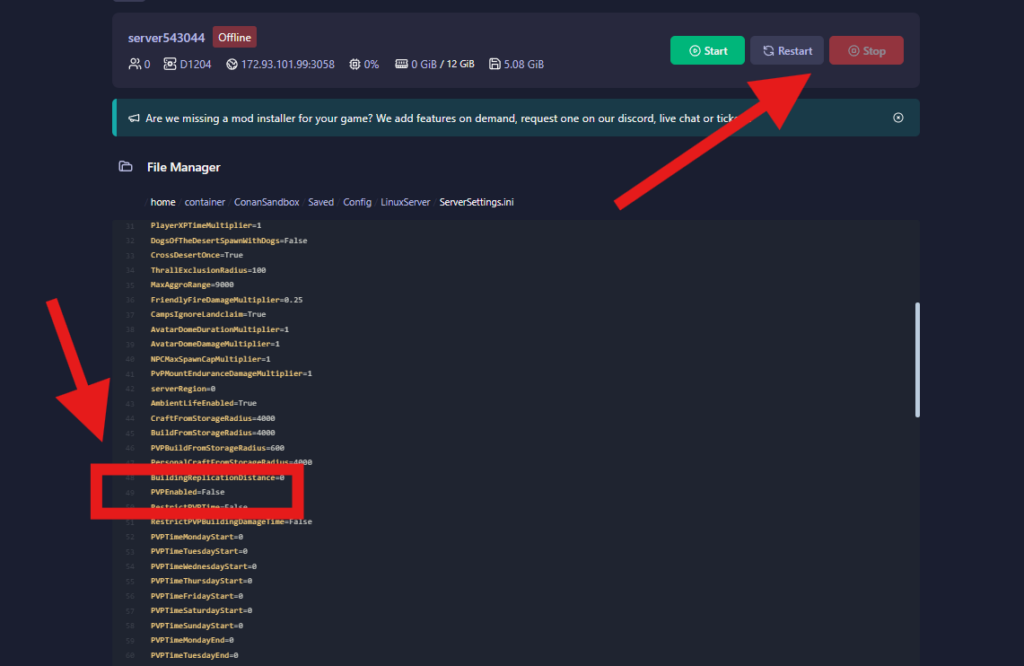
- Stop your server: Head over to your control panel dashboard and click the Stop button to prevent data corruption while editing files.
- Find the config folder: Select the “Files” tab and open the folders following the path:
ConanSandbox/Saved/Config/LinuxServer/ - Edit the settings file: Locate and click to open the
ServerSettings.inifile inside the built-in file editor. - Modify the PvP line: Use your keyboard shortcut (CTRL + F) to find the text line reading
PVPEnabled=False. To turn on player combat, switch it toPVPEnabled=True. To turn it off and force PvE, set it back toFalse. (Tip: This file also contains other nearby settings for raid times and combat rules that you can customize). - Save your adjustments: Click the Save button at the bottom of the editor window, or press CTRL + S on your keyboard.
- Relaunch the server: Start your server and join!
Running your Conan Exiles server on GGServers ensures you get reliable performance, low latency, and easy control panel management for testing new game updates. Use code KB30 at checkout to receive 30% off your first invoice when ordering your server.
If you need further help, our support team is available 24/7 at: https://ggservers.com/billing/submitticket.php