 Billing
& Support
Billing
& Support Multicraft
 Game
Panel
Game
Panel



How to Validate Game Files on Your Enshrouded Server
File corruption can lead to server crashes, missing assets, or connectivity issues in Enshrouded. The Validate feature forces the server to check its current installation against the official Steam manifest, repairing or replacing any damaged or missing files. This is a crucial troubleshooting step for maintaining a stable world. Follow the steps below to run a validation check through the GGServers panel.
Step 1: Access the Panel
Log in to your GGServers Control Panel and select your Enshrouded server. This dashboard contains all the diagnostic and repair tools for your instance.
Step 2: Stop Your Server
You cannot validate files while the server is actively using them. Click the red Stop button on the main console. Wait for the status to show “Offline” before proceeding to the settings menu.

Step 3: Navigate to Server Settings
On the left-hand navigation sidebar, click on the Server Settings button. This menu holds the technical configuration tabs for your Enshrouded instance.

Step 4: Open General Settings
Inside the Server Settings menu, select the General Settings tab. This section contains the core maintenance toggles, including the validation tool.

Step 5: Change the Setting That Will Auto Save
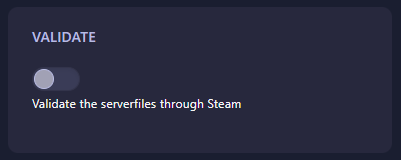
Locate the box labeled Validate. Toggle the switch to enable it. The GGServers panel features an automatic save function, so the instruction is recorded instantly. Once enabled, the server will perform a full integrity check the next time it starts up.
Step 6: That is it!
Your repair task is scheduled! Return to the main dashboard and click Start. The server will verify its files; please note that the startup process may take slightly longer than usual while the validation runs.
Experience peak stability with Enshrouded server hosting at GGServers. Our easy-to-use maintenance tools ensure your world stays corrupt-free and ready for exploration!