 Billing
& Support
Billing
& Support Multicraft
 Game
Panel
Game
Panel



Hytale Dual Wielding Guide: How to Use the Left Hand and Off-Hand Menu
Hytale’s combat and exploration systems are built around versatility, and one of the most powerful features available to players is the ability to use their left hand. Whether you are holding a torch while mining or a shield during a heated battle, mastering the off-hand system is essential for survival in Orbis. In this guide, we will show you how to configure your left-hand items and use the dedicated selection menu to switch equipment on the fly.
Step 1: Understand the Off-Hand Mechanics
In Hytale, your left hand acts as a utility slot. While many heavy weapons require both hands, several items like torches, shields, and certain consumables can be held in your off-hand. To manage this equipment, you will use the Z key on your keyboard, which opens a specialized quick-access pocket for your left hand. If you haven’t crafted a torch to test this out yet, follow our guide below:
Step 2: Access Your Inventory
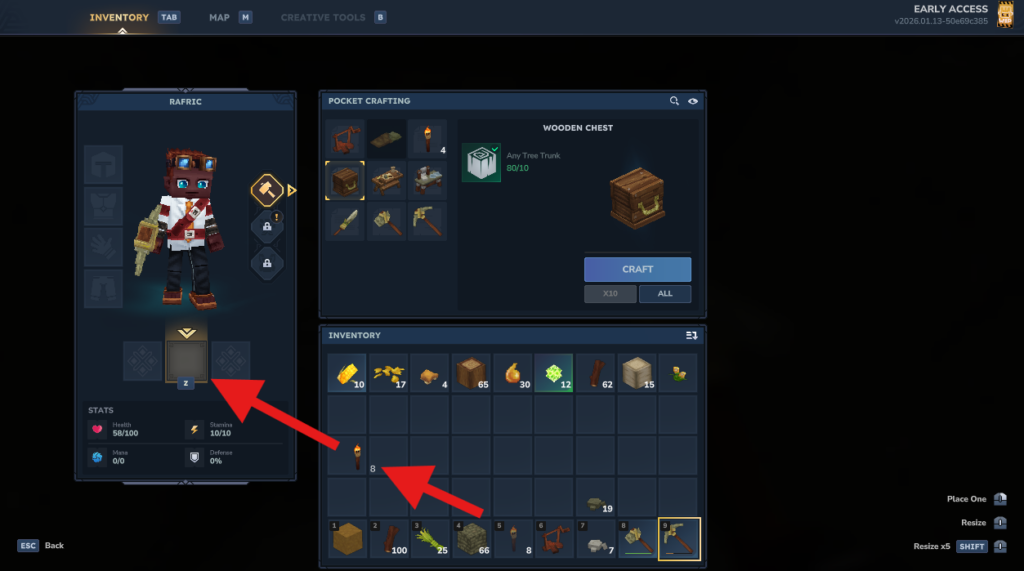
To begin setting up your dual-wielding loadout, press the TAB key to open your main inventory. Look at your character equipment slots; you will see a highlighted area specifically designated for left-hand items. This is separate from your standard 1-9 hotbar.
Step 3: Assign Items to the Left-Hand Slot
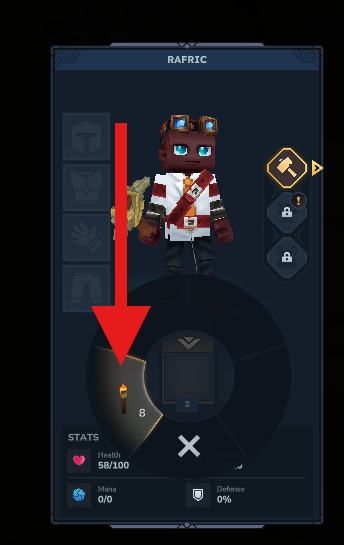
Take the item you wish to use—in this case, your torch—and drag it into the highlighted off-hand menu. This action tells the game that this item is now available for dual-wielding. You can place multiple compatible items here to create a rotation of utility tools.
Step 4: Use the Quick-Switch Menu
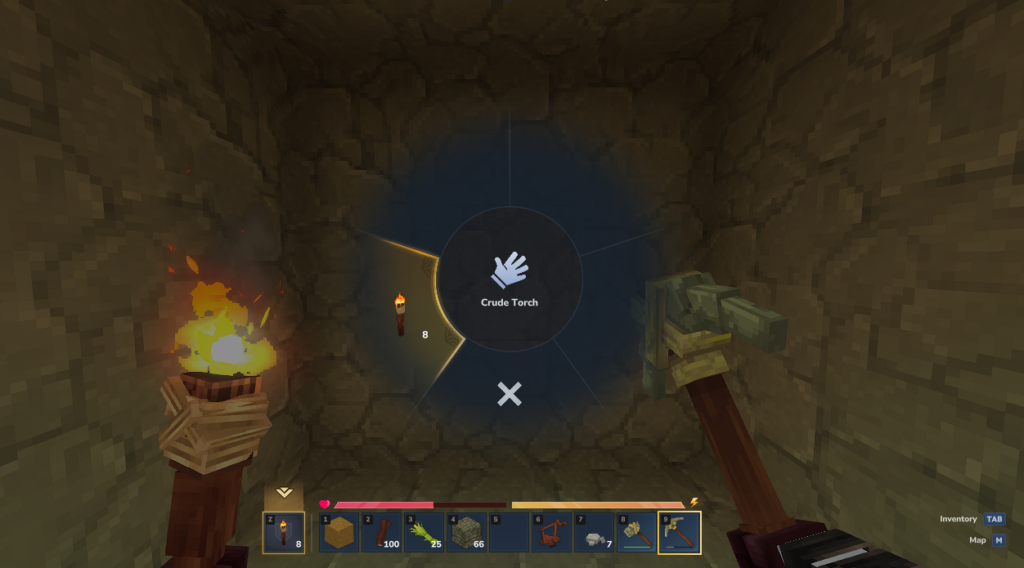
When you are out in the world, you can switch between your left-hand items without opening your full inventory. Hold the Z key to bring up the circular off-hand menu. While holding the key, move your mouse to hover over the item you want to equip and release the key to confirm your choice.
Step 5: Master Dual-Wielding Gameplay
With your torch in your left hand and a pickaxe or sword in your right, you are now a much more efficient explorer. This setup allows you to keep your surroundings lit while simultaneously mining or defending yourself against the creatures of the dark. Remember, holding a heavy two-handed weapon will automatically stow your left-hand item until you switch back to a one-handed tool.
Conquering the dungeons of Hytale is always better with a party. To ensure your multiplayer adventure is lag-free and always online, choose GGServers for your Hytale Server Hosting. Our high-performance nodes are perfect for smooth dual-wielding combat and exploration.