 Billing
& Support
Billing
& Support Multicraft
 Game
Panel
Game
Panel



General Info
In this guide, we will show you how to change inventory loss and death penalty settings on a Hytale server step by step.
This setting is useful for server owners who want to reduce inventory loss or make survival gameplay more forgiving.
If you want to change the inventory loss and percentage for Hytale, you can do so by editing the world configuration file. This allows you to control how many items are lost on death and how much durability damage items receive.
How to Change Inventory Loss on a Hytale Server (Death Penalty Settings)
- Access your Control Panel.
- Stop the server.
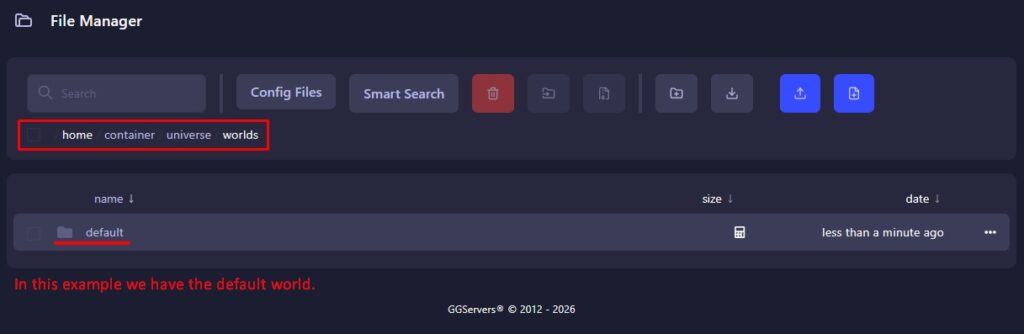
- Go to the Files tab.
- Navigate to the following directory:
/home/container/universe/worlds - Open the desired World folder. The death penalty can vary from world to world.
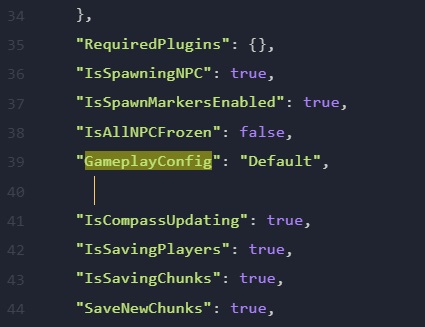
- Open the config.json file.
- Under the “GameplayConfig” line, press Enter to create a new line.
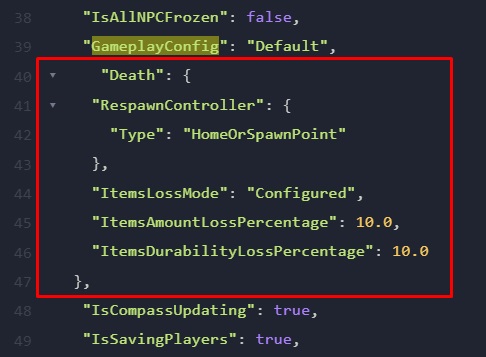
- Paste the following configuration:
"Death": {
   "RespawnController": {
     "Type": "HomeOrSpawnPoint"
   },
   "ItemsLossMode": "Configured",
   "ItemsAmountLossPercentage": 10.0,
   "ItemsDurabilityLossPercentage": 10.0
 },
- Edit the ItemsLossMode settings depending on how you want the inventory loss to behave when a player dies.
| Setting | Description |
|---|---|
| ItemsLossMode | Sets the death penalty to None, All, or Configured. None – Item loss is disabled. All – All items are dropped on death. Configured – Inventory loss is controlled manually using the percentage settings below. |
| ItemsAmountLossPercentage | Controls the percentage of items that players lose when they die. |
| ItemsDurabilityLossPercentage | Controls how much durability items lose after a player dies. |
- Press the Save button.
- Start the server.
FAQ
Can I disable inventory loss in Hytale?
Yes. You can disable inventory loss completely by setting the ItemsLossMode value to “None” in the config.json file. This will prevent players from losing any items when they die.
How do I change the percentage of items lost on death?
You can control the percentage of inventory loss by editing the ItemsAmountLossPercentage value in the configuration file. For example, setting it to 10.0 means players will lose 10% of their items on death.
Can each world have different death penalty settings?
Yes. Hytale allows different configuration settings for each world. This means you can apply different inventory loss percentages depending on which world players are in.
What does ItemsDurabilityLossPercentage do?
This setting controls how much durability damage items receive when a player dies. Increasing this value will cause items to lose more durability after death.