 Billing
& Support
Billing
& Support Multicraft
 Game
Panel
Game
Panel



How to Enable or Disable PvP on Your Hytale Server
Hytale offers a versatile world where you can choose between peaceful co-op exploration or intense player-vs-player combat. Depending on the type of community you are building on your Hytale dedicated server, you may want to toggle PvP on or off. This guide will show you two easy methods to change your combat settings: using the direct File Manager or the simplified GGServers settings toggle.
Method 1: Configuring PvP via config.json
If you prefer to manage your world settings directly through the game files, you can modify the core configuration file. This method is useful for making several world changes at once.
Step 1: Access the File Manager
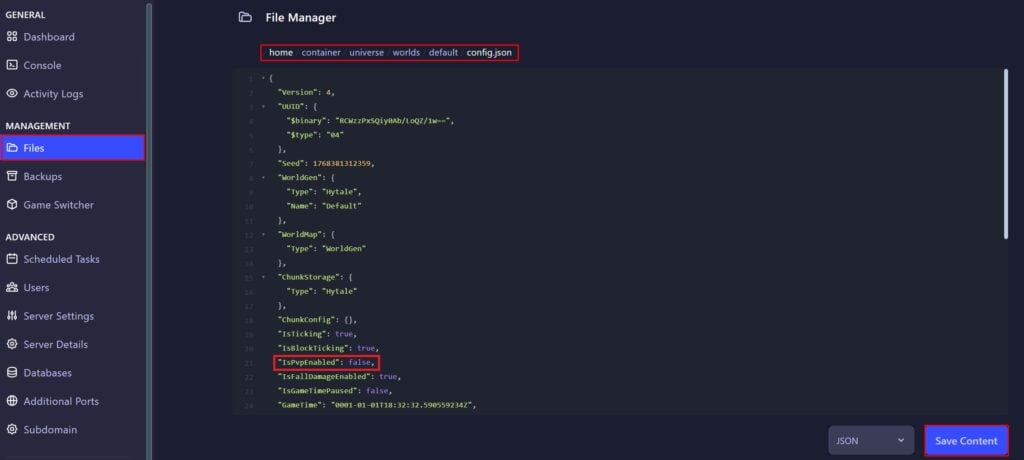
Log in to the GGServers Control Panel and select your Hytale server. On the left-hand menu, click on the Files tab to open the server’s directory.
Step 2: Locate the World Configuration
Navigate through the following folders: /home/container/universe/worlds/default/. Once there, find the file named config.json and click it to open the built-in text editor.
Step 3: Modify the IsPvpEnabled Value
Inside the file, look for the line labeled “IsPvpEnabled”. To allow player combat, set this to true. To prevent players from hurting each other, set it to false. Click Save Content when finished.
Method 2: Using the General Settings Toggle
For a faster, more user-friendly approach, you can use the built-in toggles in the GGServers panel. This method handles the file editing for you automatically.
Step 1: Stop Your Hytale Server
Before changing global settings, you must Stop your server. This ensures that the new PvP rules are properly initialized during the next startup sequence.

Step 2: Navigate to Server Settings
On the left-hand sidebar of the panel, click the Server Settings button to expand the management options.

Step 3: Open General Settings
From the submenu, select the General Settings tab. This area contains the primary gameplay toggles for your world.

Step 4: Toggle the PvP Switch
Locate the box labeled Enable PVP. Simply click the switch to your preferred state. The GGServers panel features an auto-save function, so your change is recorded immediately. You can now return to the dashboard and Start your server.

Whether you are hosting a friendly co-op world or a competitive battleground, the best performance is found with Hytale Server Hosting at GGServers. Our optimized hardware ensures that combat remains smooth and lag-free for all players!