 Billing
& Support
Billing
& Support Multicraft
 Game
Panel
Game
Panel



Today we are going to go over how to manage the whitelist on your server, including adding and removing players. A whitelist is a simple yet effective method of access control for your server, whether it’s a personal server for friends and family or a public server you aren’t ready to open yet. This process is very easy using the GGServers Game Panel console.
Enabling or Disabling the Whitelist
- Log in to your GGServers Panel.
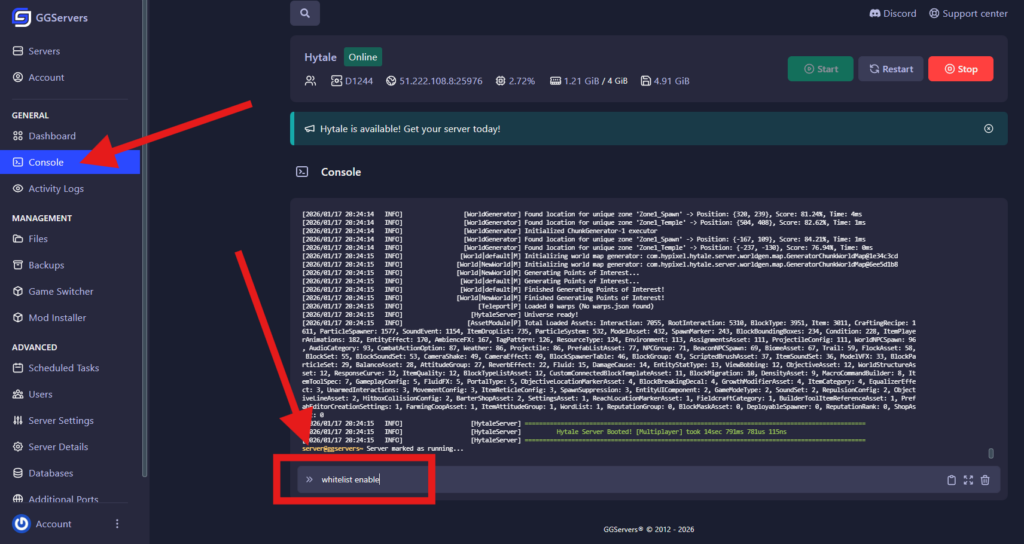
- Select your Hytale server and click on the Console tab in the left-hand sidebar.
- In the console command line, type
whitelist enableto turn the whitelist on. - To turn it off at any time, simply type
whitelist disable.
Note: If you are an admin (OP) on the server, these commands can be executed in-game by pressing / to open the chat/command field. Once enabled, all operators/admins can join automatically, but regular players must be added to the list to gain access.
Adding and Removing Players
- Navigate to your Console tab in the GGServers panel.
- To permit a player to join, type:
whitelist add <username> - To revoke access for a player, type:
whitelist remove <username>
Once a player is added to the whitelist, they will be able to connect to the server immediately.

All Whitelist Commands
Below is a quick reference for all available whitelist management commands:
| Command | Action |
|---|---|
whitelist add <username> | Adds a specific player to the whitelist. |
whitelist remove <username> | Removes a specific player from the whitelist. |
whitelist enable | Turns the whitelist restriction ON. |
whitelist disable | Turns the whitelist restriction OFF. |
whitelist clear | Removes all players from the whitelist at once. |
whitelist status | Checks if the whitelist is currently active or inactive. |
whitelist list | Displays all players currently on the whitelist. |
Conclusion
You now have full control over your server’s access list! Using a whitelist is a great way to maintain a private community without the hassle of managing server passwords. For more security tips, check out our other Hytale guides.
If you need more help with Hytale settings or server management, contact us at GGServers Support. We are happy to assist you!