 Billing
& Support
Billing
& Support Multicraft
 Game
Panel
Game
Panel



Generating a new instance on a Hytale server offers a clean canvas for construction and exploration. The game’s procedural engine creates a unique arrangement of biomes and dungeons, distinguishing the map from previous iterations. Such a reset permits the integration of new content or rules without disrupting established settlements. Players benefit from a leveled economy where resource accumulation begins at zero. A fresh start reinvigorates the user base by restoring the initial challenge of survival and discovery.
- Log in to your GGServers Panel.
- Select your Hytale server and navigate to the Console tab on the left-hand sidebar.
- Enter your desired world management command into the command line.
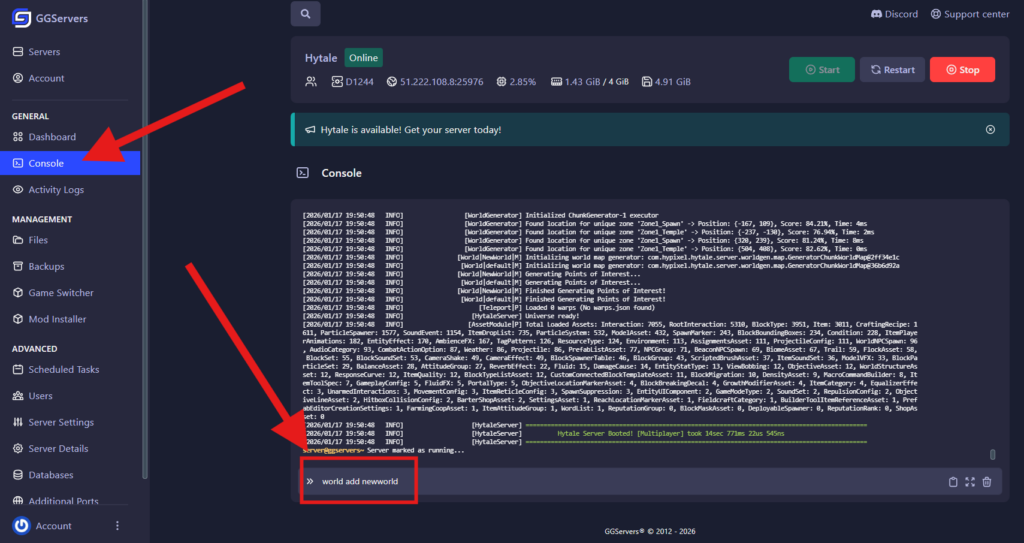
Run console commands without slash “/”.
Available World Commands
| Command | Description |
|---|---|
world add <name> | Generates a brand new world instance. |
world list | Displays all currently loaded worlds on the server. |
world setdefault <name> | Sets the specified world as the default spawn for new players. |
world load <name> | Loads an existing world to run on the server. |
world remove <name> | Deletes the specified world from the server. |
world prune --confirm | Removes all worlds that currently have no active players. |
Note: These commands can also be executed in-game if you have OP (Administrator) permissions. If you haven’t set yourself as an admin yet, check out our guide on How to OP Yourself on Hytale.
If you need more help with Hytale settings or server management, contact us at GGServers Support. We are happy to assist you!