 Billing
& Support
Billing
& Support Multicraft
 Game
Panel
Game
Panel



How to Disable Sentry Error Tracking on Your Hytale Server
Hytale uses a service called Sentry to automatically track and report server crashes and errors to the developers. While this is helpful for general bug reporting, it can be a nuisance for modders and plugin developers. If you are actively testing new code, Sentry may trigger excessive logs or reporting alerts for “known” bugs you are currently fixing. This guide will show you how to quickly disable Sentry tracking using the GGServers panel settings.
Step 1: Access the Panel and Stop Your Server
To modify core system behaviors like error tracking, the server must be fully offline. Log in to your GGServers Control Panel, select your Hytale service, and click the red Stop button. Wait for the console to confirm the process has terminated.

Step 2: Navigate to Server Settings
Once the server status is offline, locate the sidebar on the left side of the screen. Click on the Server Settings button. This menu contains the high-level configuration options for your Hytale instance.

Step 3: Open the General Settings Tab
Inside the Server Settings menu, click on the General Settings tab. This section manages core world rules and technical launch arguments.

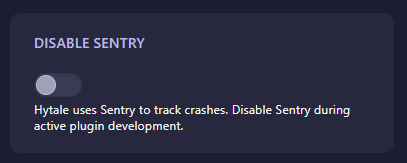
Step 4: Toggle “Disable Sentry”
Scroll down to find the box labeled Disable Sentry. Toggle this switch to the “on” position. By enabling this toggle, you are adding the --disable-sentry flag to your server’s launch command, which prevents the server from sending crash reports to the central Hytale telemetry servers. The GGServers panel will automatically save your changes.
Step 5: Restart Your Server
Return to the main dashboard and click Start. Your server will now boot up without initializing the Sentry client, which can also slightly improve startup performance and reduce background network traffic.
Whether you are developing complex plugins or just want more privacy for your server logs, GGServers Hytale Server Hosting provides the granular control you need. Our panels make it easy to manage advanced launch arguments with a single click!