 Billing
& Support
Billing
& Support Multicraft
 Game
Panel
Game
Panel



Hytale is finally here, and crafting stations play a huge role in how you build, refine materials, and expand your base. One of the most important early-game stations is the Builder’s Bench, which unlocks refined building materials like Planks (Refined Wood).
In this guide, you’ll learn how to craft and use the Builder’s Bench in Hytale, as well as how to turn raw Tree Logs into refined building materials.
How to Craft a Builder’s Bench in Hytale
You can craft a Builder’s Bench either from your Workbench or directly using Pocket Crafting by pressing TAB. This flexibility makes it easy to unlock early, even while exploring.
Materials Required
To craft a Builder’s Bench, you’ll need the following resources:
- 6x Tree Logs
- 3x Stones
To gather Tree Logs and Stones efficiently, you must first craft Crude Tools, which are essential for early-game resource collection.
👉 How to Craft Crude Items in Hytale
We’ve already covered this step in detail in our previous guide:
Crafting and Placing the Builder’s Bench
Once you have the required materials, press TAB, select the Builder’s Bench from the crafting menu, and click Craft.
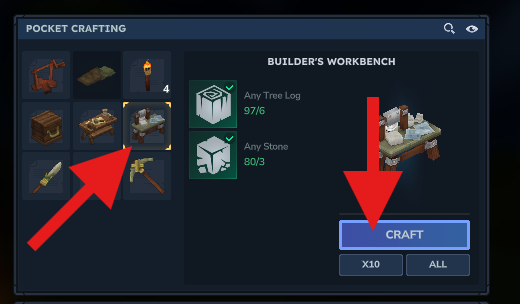
After crafting, choose a good location in your base and place the Builder’s Bench.

Press F to open the Builder’s Bench interface.
How to Craft Planks (Refined Wood) in Hytale
The Builder’s Bench allows you to convert raw materials into refined building components. To get started, place an item—such as Tree Logs—into the input slot.
The interface will automatically display all possible recipes that can be crafted from that material, including Planks (Refined Wood).
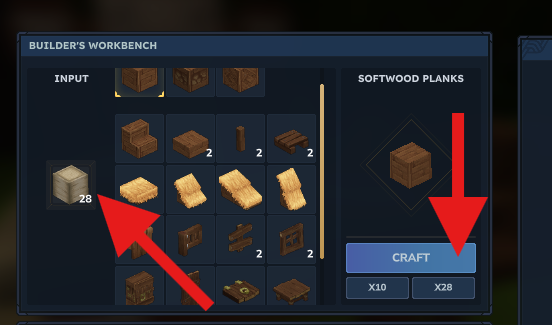
This refined wood is essential for advanced structures, decorations, and future crafting stations, making the Builder’s Bench a core progression tool.
And that’s it! You now know how to craft and use the Builder’s Bench in Hytale and how to create refined wood for your builds.
Building with friends? Get the smoothest multiplayer experience with GGServers Hytale Server Hosting. Enjoy high performance, low latency, instant setup, and full mod support. Use code KB30 for 30% OFF.