 Billing
& Support
Billing
& Support Multicraft
 Game
Panel
Game
Panel



How to Accept and Enable Early Plugins on Your Hytale Server
As Hytale enters its Early Access phase in 2026, many developers are releasing “Early Plugins” (also known as Bootstrap Plugins). Unlike standard plugins that run through the Hytale API, Early Plugins execute during the server’s initial boot sequence to allow for low-level bytecode modifications. Because these run before the server is fully initialized, they can cause significant stability issues. This guide will show you how to bypass the safety warning and enable these advanced mods on your GGServers hosting panel.
Step 1: Stop Your Hytale Server
Enabling early-loading features requires a full reboot of the server’s Java process. To avoid data corruption or configuration conflicts, navigate to your GGServers Control Panel and click the Stop button. Wait for the status indicator to turn red before proceeding.

Step 2: Access the Server Settings
With the server stopped, locate the sidebar on the left side of the dashboard. Click on Server Settings. This menu allows you to modify the launch arguments that the GGServers panel sends to the Hytale executable.

Step 3: Open General Settings
In the Server Settings submenu, click on the General Settings tab. This is where core gameplay and technical toggles, such as PvP and Operator permissions, are managed.

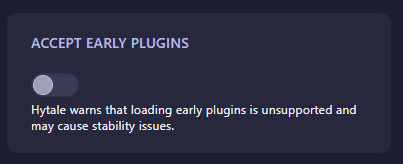
Step 4: Toggle “Accept Early Plugins”
Scroll down to find the box labeled Accept Early Plugins. Toggling this switch adds the --accept-early-plugins flag to your server launch. Note: Hytale warns that early plugins are technically unsupported and may cause the server to crash or behave unexpectedly. Only enable this if you are using specific bootstrap mods from trusted sources like CurseForge.
Step 5: Start Your Server
The panel will automatically save your changes. You can now return to the main console and click Start. The server will now bypass the manual confirmation prompt and load any JAR files located in your /earlyplugins folder automatically.
Experimenting with the latest Hytale mods requires a server that can handle the load. To ensure your modded world remains stable and fast, we highly recommend Hytale Server Hosting at GGServers. Our hardware is optimized for Java 25 and the high memory demands of early-access plugins!