 Billing
& Support
Billing
& Support Multicraft
 Game
Panel
Game
Panel



How to Set Your Dune 2000 Server to Public
By default, your Dune 2000 server might be hidden from the global lobby. To ensure that players from around the world can see and join your matches on Arrakis, you need to enable the Public Server setting. On the GGServers panel, this is a simple toggle that broadcasts your server to the master list. Follow the steps below to make your server public.
Step 1: Stop Your Server
Before changing any global visibility settings, it is important to stop your server to ensure the configuration is applied correctly. Navigate to your GGServers Control Panel and click the red Stop button.

Step 2: Access Server Settings
On the left-hand navigation sidebar, click on the Server Settings button to open the management configuration options.

Step 3: Open General Settings
In the Server Settings menu, select the General Settings tab. This section contains the core identity and visibility rules for your Dune 2000 instance.

Step 4: Toggle the Public Server Switch
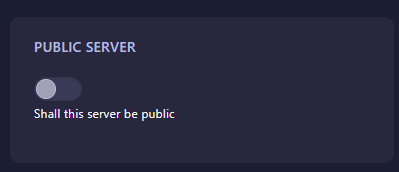
Locate the box labeled Public Server. Click the switch to enable it. This will allow your server to communicate with the master lobby list. The GGServers panel will automatically save your choice immediately.
Step 5: Start Your Server
Return to the main console and click Start. Your Dune 2000 server is now live and will appear on the public lobby list for all players to see!
Ready to build a massive community on Arrakis? Get a Dune 2000 server at GGServers and host public matches with industry-leading uptime and performance!