 Billing
& Support
Billing
& Support Multicraft
 Game
Panel
Game
Panel



How to Adjust the Auto-Save Interval on Your Soulmask Server
The Save Time Interval is a critical setting for Soulmask server administrators. It defines how frequently the server writes game object data to the database, measured in seconds. A shorter interval minimizes data loss in the event of a crash, while a longer interval can reduce CPU and disk I/O load, which helps prevent “save lag” during peak gameplay. Follow the steps below to customize your save frequency using the GGServers panel.
Step 1: Access the Panel
Log in to your GGServers Control Panel and select your Soulmask server. This dashboard allows you to manage the performance and persistence settings of your world.
Step 2: Stop Your Server
Changing the save interval requires a restart of the server process to apply the new timing logic. Click the red Stop button on the main console and wait for the status to confirm as “Offline” before moving to the settings menu.

Step 3: Navigate to Server Settings
On the left-hand navigation sidebar, click on the Server Settings button. This menu provides access to all the primary configuration categories for your Soulmask instance.

Step 4: Open General Settings
Within the Server Settings menu, select the General Settings tab. This section handles the core performance and identity rules for your Soulmask server.

Step 5: Change the Setting That Will Auto Save
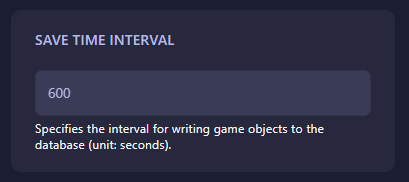
Locate the box labeled Save Time Interval. Enter the desired interval in seconds (e.g., 600 for every 10 minutes). The GGServers panel features an automatic save function, so your new interval is recorded the moment you finish entering the value. A common default for stable performance is 600 seconds.
Step 6: That is it!
Your persistence settings are updated! Return to the main dashboard and click Start. Your Soulmask server will now automatically save the game world at the new interval you specified.
Ensure your progress is always safe with Soulmask server hosting at GGServers. Our high-speed NVMe storage ensures that auto-saves are fast and seamless, keeping your tribal adventure lag-free!