 Billing
& Support
Billing
& Support Multicraft
 Game
Panel
Game
Panel



How to Change the Server Region on Your Sunkenland Server
Setting the correct region for your Sunkenland dedicated server is vital for player connectivity. Because the Sunkenland in-game browser filters servers by region cluster, players must select the same region in their game client to find and join your server. Follow this guide to update your region setting via the GGServers panel.
Step 1: Access the GGServers Panel and Stop Your Server
Log in to the GGServers Control Panel. Before modifying the region settings, you must Stop your server. This ensures that the new region code is properly applied to the server’s startup arguments.

Step 2: Navigate to Server Settings
On the left-hand navigation sidebar, click on the Server Settings menu. This will display the various configuration options for your Sunkenland instance.

Step 3: Open the General Settings Tab
Within the settings sub-menu, select the General Settings tab. This section contains the core network and identity parameters for your server, including the region code.

Step 4: Update the Region Code
Locate the box labeled Region. Enter the appropriate region code from the list below. The GGServers panel features an auto-save system, so your changes are applied instantly.
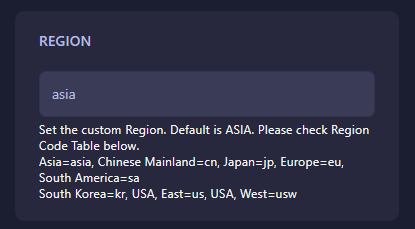
| Location | Region Code |
|---|---|
| Asia (Default) | asia |
| USA, East | us |
| USA, West | usw |
| Europe | eu |
| South America | sa |
| Japan | jp |
| South Korea | kr |
| Chinese Mainland | cn |
Step 5: Start Your Server
Once you have set the region, return to the main dashboard and click Start. Your server will now be visible to players searching within that specific region cluster.
If you or your players still cannot find the server, ensure your game client is set to the same region as the server. For further help, contact us at GGServers Support.