 Billing
& Support
Billing
& Support Multicraft
 Game
Panel
Game
Panel



How to Join an OpenTTD Server
Joining a multiplayer game in OpenTTD is a straightforward process. Whether you want to connect directly via an IP address or find your community through the public server list, the GGServers panel makes it easy to get your logistics empire online. Follow these steps to connect to your server.
Step 1: Start Your Server and Copy the IP
Log in to the GGServers Control Panel. Ensure your server is Started. Once the status shows as online, locate and copy the Server IP (including the port number, typically 3979) from the main dashboard.


Step 2: Access the Multiplayer Menu
Launch OpenTTD on your computer. From the main intro screen, click on the Multiplayer button to open the server browser.
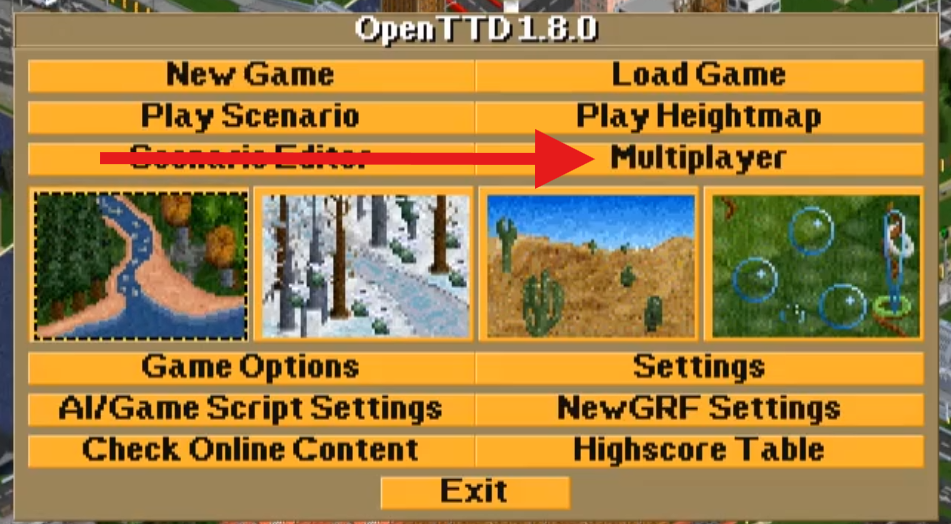
Step 3: Add Your Server
In the multiplayer window, click the Add Server button at the bottom. A prompt will appear asking for the server address. Paste the IP address you copied earlier and click OK.
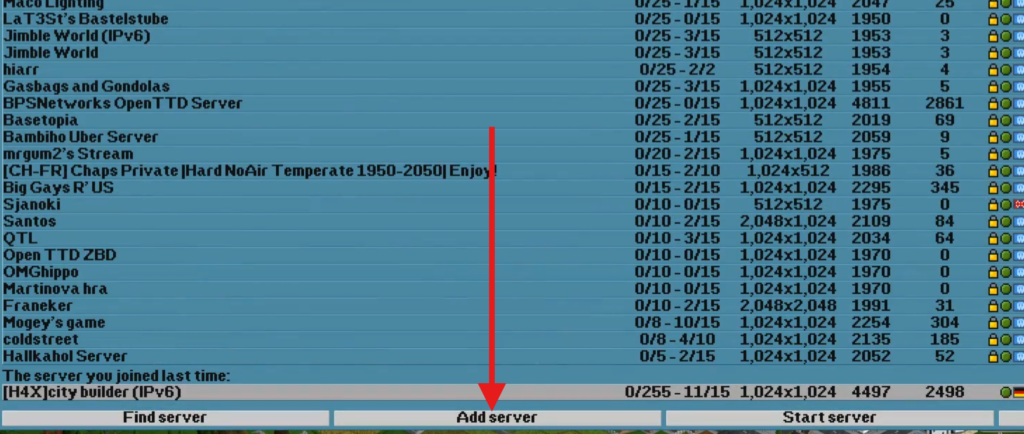
Step 4: Connect and Play
Your server will now appear in the list. Select it and click Join Game. If your server is advertised publicly, you can also find it by typing your server’s name into the Filter string box at the bottom of the internet search list.
If you have any issues connecting or downloading required NewGRFs, please contact us at GGServers Support.