 Billing
& Support
Billing
& Support Multicraft
 Game
Panel
Game
Panel



Learning how to join an ARK: Survival Evolved server is quick and easy—especially when you’re hosting on GGServers, a leading high-performance ARK server provider. Below is a fully detailed step-by-step guide to help you connect to your world effortlessly. This improved tutorial includes SEO-friendly explanations, clear instructions, and helpful screenshots to make the entire process smooth. If you don’t have a server yet, use code KB30 for 30% OFF any ARK server at GGServers.
Step 1 — Access Your GGServers Control Panel
First, log into your ARK control panel at https://panel.ggservers.com/. GGServers uses a fast and intuitive Multicraft-like panel designed for easy management, automatic updates, and reliable uptime—perfect for ARK players wanting smooth gameplay.
Step 2 — Start Your ARK Server

Once the server status is green and running, you’re ready to connect!
Step 3 — Copy the Server IP Address & Port
Find your server’s IP and port on the main panel page and copy it.

Step 4 — Add the Server to Steam
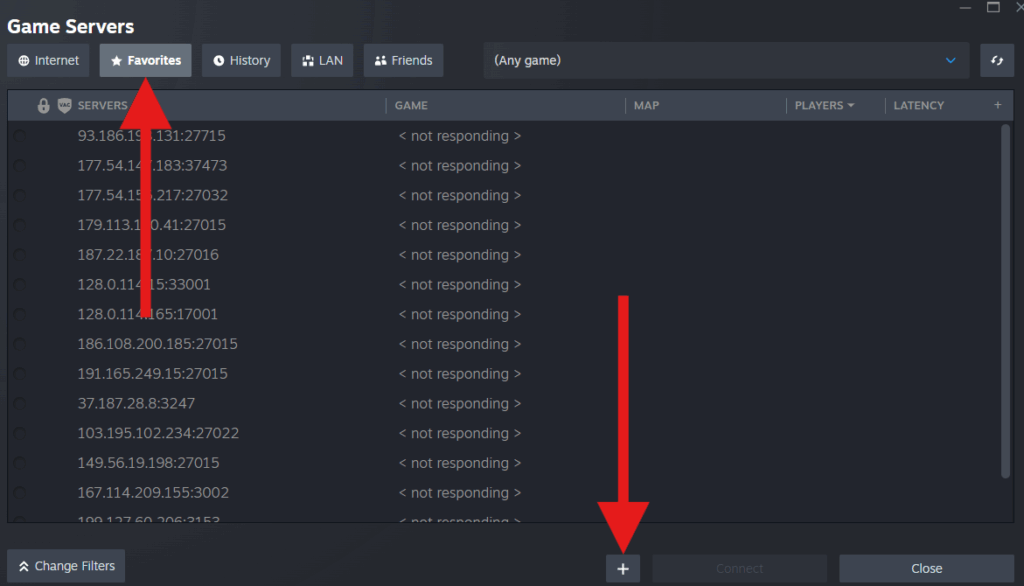
On Steam, click View → Game Servers. This built-in Steam feature lets you manually add and save your dedicated servers for quick access.

Go to the Favorites tab and click the + icon to add a new server.
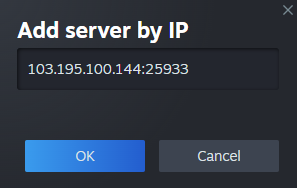
Paste your server IP:PORT and click OK.
Step 5 — Launch ARK and Join Your Server

In the main ARK menu, click Join ARK. This opens the full server browser.
On the bottom-left, select your Favorites list:

Your GGServers-hosted ARK server will appear here. Select it and click Join to enter your world!

And that’s it! You’re now connected to your ARK: Survival Evolved server. If you ever need ultra-low latency hosting, automated backups, full mod support, or 24/7 expert assistance, GGServers is the best place to host ARK servers with premium hardware at a budget-friendly price.
Use code KB30 for 30% OFF at: https://ggservers.com/ark-server-hosting