 Billing
& Support
Billing
& Support Multicraft
 Game
Panel
Game
Panel



General Info
Decay settings on a SCUM server control how quickly items, food, and weapons lose durability over time. Adjusting these values allows you to create a more forgiving experience or increase the challenge by making resources degrade faster.
This guide will show you how to change decay settings on a SCUM server, including item decay, food spoilage, and weapon durability. These settings are useful for customizing gameplay and balancing your server to match your community’s preferences.
How to Change Decay Settings on a SCUM Server
- Log in to your GGServers Control Panel.
- Stop the server.
- Go to the Files tab and navigate to:
SCUM/Saved/Config/WindowsServer
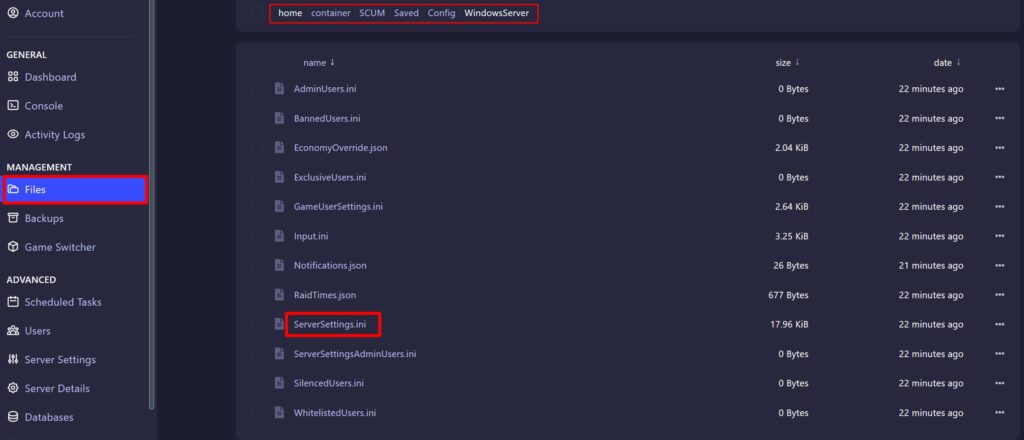
- Open the ServerSettings.ini file and locate the [Damage] section.
Usually at line 291
- Edit the decay values based on your preferences. Higher values increase the rate at which items degrade.
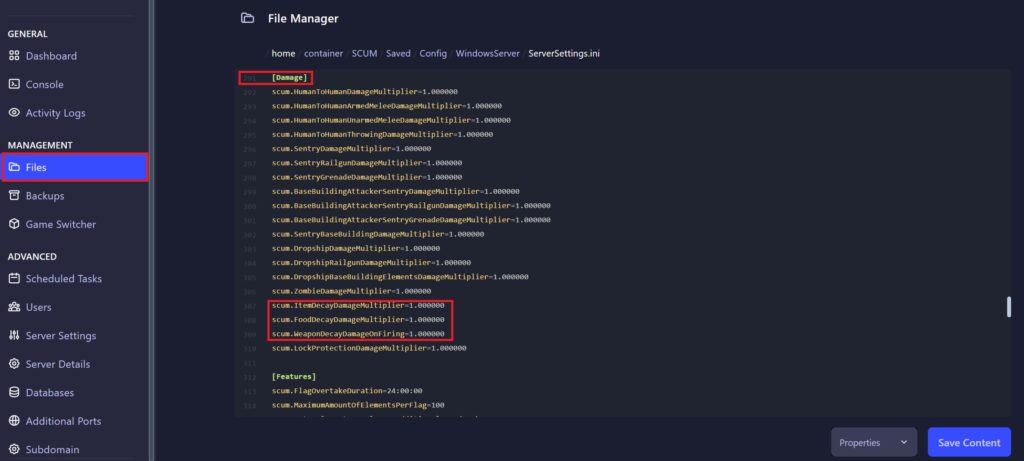
| Setting | Value | Description |
|---|---|---|
| scum.ItemDecayDamageMultiplier= | 0 – 10 | Controls how fast items lose durability over time. A value of 1.0 equals roughly 1.4% decay per 24 hours. |
| scum.FoodDecayDamageMultiplier= | 0 – 10 | Controls how quickly food spoils. |
| scum.WeaponDecayDamageOnFiring= | 0 – 10 | Controls how much durability weapons lose when firing. |
- Click the
Save Contentbutton. - Start the server.
FAQ
What does decay mean in SCUM?
Decay refers to how items, food, and weapons lose durability or spoil over time on your server.
How do I reduce item decay on my SCUM server?
Lower the multiplier values in the ServerSettings.ini file. Setting them close to 0 will significantly slow down decay.
Can I disable decay completely?
Yes, setting the decay multipliers to 0 will effectively disable most decay mechanics.
Why are my items breaking too fast?
This usually happens when decay multipliers are set too high. Lower the values to make items last longer.