 Billing
& Support
Billing
& Support Multicraft
 Game
Panel
Game
Panel



Running a DayZ server is no small task, and nothing disrupts a session quite like an unexpected crash or a sudden, unannounced restart.
Whether you’re managing a small private server for friends or hosting a busy public community, keeping players informed before a restart is the difference between a smooth experience and a flood of frustrated messages in your Discord.
In this guide, we’ll walk you through how to set up an automated restart schedule for your DayZ server, complete with an in-game shutdown message so your players always get a heads-up before the server goes down.
Step 1: Access the Panel
Log in to your GGServers Control Panel. Here you will be able to manage anything related to your server.
Step 2: Stop the Server
To safely modify any configuration options, add mods or any task similar to that, the server will have to be stopped to prevent any issues from taking place.

Step 3: Edit the messages.xml file
To do this, please go to your File Manager and navigate to mpmissions\<missionnamehere>\db and edit the messages.xml file. If it doesn’t exist, you can manually create it.
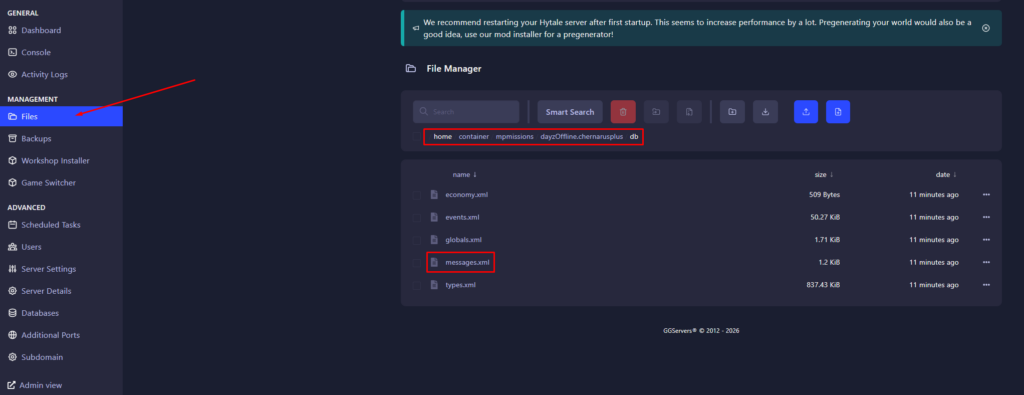
Step 4: Edit the file to your liking
Each message fires based on its <deadline> value, which is measured in seconds. The server works through them in descending order — the highest deadline fires first, counting down until the next one takes over.
Once the final message’s deadline expires and <shutdown> is set to 1, the server restarts. So in the example above, the sequence looks like this:
1800 (30 min) → First warning, no shutdown
600 (10 min) → Second warning, no shutdown
1800 (30 min) → First warning, no shutdown
<?xml version="1.0" encoding="UTF-8" standalone="yes"?>
<messages>
    <message>
        <delay>0</delay>
        <repeat>0</repeat>
        <deadline>1800</deadline>
        <onConnect>0</onConnect>
        <shutdown>0</shutdown>
        <text>Heads up, #name will restart in 30 minutes.</text>
    </message>

    <message>
        <delay>0</delay>
        <repeat>0</repeat>
        <deadline>600</deadline>
        <onConnect>0</onConnect>
        <shutdown>0</shutdown>
        <text>Warning, #name will restart in 10 minutes.</text>
    </message>

    <message>
        <delay>0</delay>
        <repeat>0</repeat>
        <deadline>300</deadline>
        <onConnect>0</onConnect>
        <shutdown>1</shutdown>
        <text>Final warning, #name is restarting in 5 minutes. Please find safety!</text>
    </message>
</messages>
Step 5: Save the file and then restart the server

Done, your server should now have automatic restarts with scheduled messages to make your players aware.