 Billing
& Support
Billing
& Support Multicraft
 Game
Panel
Game
Panel



How to Change the OpenRCT2 Version on Your Server
Keeping your server updated ensures you have the latest features, bug fixes, and compatibility with the newest ride designs. Whether you want to stick to a stable release, use the cutting-edge development builds, or roll back to a specific version for compatibility, the OpenRCT2 Version setting gives you full control over your installation. Follow the steps below to manage your server’s versioning on the GGServers panel.
Step 1: Access the Panel
Log in to your GGServers Control Panel and select your OpenRCT2 server. This dashboard is where you manage the core software installation and updates for your park.
Step 2: Stop Your Server
Updating or changing the server version requires the system to download and reinstall core files. To prevent file corruption, you must first stop the server. Click the red Stop button on the main console. Wait for the status indicator to confirm the server is “Offline” before proceeding.

Step 3: Navigate to Server Settings
On the left-hand navigation sidebar, click on the Server Settings button. This menu provides access to the primary configuration categories for your OpenRCT2 instance.

Step 4: Open General Settings
Within the Server Settings menu, select the General Settings tab. This section contains the installation parameters and version toggles for your OpenRCT2 server.

Step 5: Change the Setting That Will Auto Save
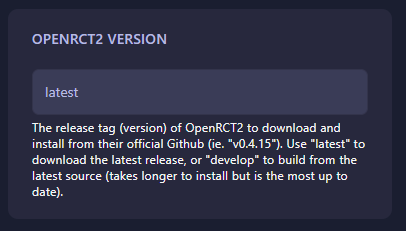
Locate the box labeled OpenRCT2 Version. You can enter one of the following options:
- latest: Downloads the most recent stable release from GitHub.
- develop: Builds from the latest source code (most up-to-date, but takes longer to install).
- Specific Version: Enter a release tag (e.g., v0.4.15) to install a specific build.
The GGServers panel will automatically save your changes once you update the text in the box.
Step 6: That is it!
Your version preference is set! Return to the main dashboard and click Start. The server will automatically download and install the version you specified before coming online.
Stay on the cutting edge of theme park simulation with OpenRCT2 server hosting at GGServers. Our powerful panel makes it easy to switch between versions and keep your coasters running smoothly!