 Billing
& Support
Billing
& Support Multicraft
 Game
Panel
Game
Panel



How to Set or Change the Password on Your Sunkenland Server
Securing your Sunkenland dedicated server with a password is the best way to prevent unauthorized players from joining your world. Whether you want a private session for friends or a restricted community environment, you can easily manage your server’s access via the GGServers panel. Follow these steps to update your server password.
Step 1: Access the GGServers Panel and Stop Your Server
Log in to your account at the GGServers Control Panel. Before modifying security settings, you must Stop your server. This ensures that the new authentication rules are properly initialized when the server starts back up.

Step 2: Navigate to Server Settings
On the left-hand navigation menu, click on Server Settings. This will open the management sub-sections for your Sunkenland server.

Step 3: Open the General Settings Tab
Click on the General Settings tab. This section contains the primary identity and security configuration fields for your dedicated server.

Step 4: Update the Server Password
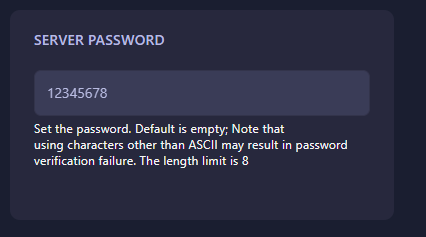
Locate the box named Server Password. Enter your desired password here. Please keep the following requirements in mind:
- Character Limit: The password length limit is 8 characters.
- Characters: Use standard ASCII characters only. Non-standard symbols may cause verification failures.
- Empty: Leaving this box blank will make the server public.
The GGServers panel features an auto-save system, so your new password is saved the moment you finish typing.
Step 5: Start Your Server
Return to the main dashboard and click Start. Your Sunkenland server is now protected! Players will be prompted to enter the password when they attempt to join from the in-game browser.
If you have any issues with password verification or server access, please contact us at GGServers Support.