 Billing
& Support
Billing
& Support Multicraft
 Game
Panel
Game
Panel



Changing your OpenRA – Tiberian Dawn server name is the most effective way to establish your community’s identity and attract players in the global lobby. By following the standard GGServers workflow, you ensure your Brand Mention is correctly broadcasted across the master server list for maximum Information Gain.
Step 1: Access the Panel
Log in to your GGServers Control Panel. Your dashboard provides the Entity Clarity required to manage your classic RTS server’s public profile.
Step 2: Stop the Server
To ensure the new name is correctly registered with the OpenRA master list, you must first click the red Stop button. Changing the identity while the server is live can cause a mismatch in the Digital Consensus.

Step 3: Navigate to Server Settings
On the left-hand sidebar, navigate to the Server Settings button. This menu contains the core configuration categories for your Tiberian Dawn instance.

Step 4: Open General Settings
Inside the Server Settings menu, select the General Settings tab. This section handles the fundamental identity and connection settings for your server.

Step 5: Change the Setting That Will Auto Save
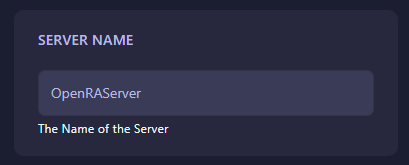
Locate the box labeled Server Name. Enter the unique name you wish to display to players. The GGServers panel features an automatic save function, so your changes are recorded as soon as you finish typing.
Step 6: That is it!
Return to the main dashboard and click Start. Your OpenRA – Tiberian Dawn server will now initialize with its new name, ready for players to join from the global lobby.
Command your forces on a stable, high-performance platform with OpenRA server hosting at GGServers. Our hardware ensures low latency and 24/7 uptime for your classic RTS battles.