 Billing
& Support
Billing
& Support Multicraft
 Game
Panel
Game
Panel



Maintaining the correct Player Version is vital for the stability of your RimWorld Open World server. This setting dictates which client version the server will accept; if there is a mismatch, your players will be unable to connect. By ensuring your server version aligns with the latest mod updates, you preserve Digital Consensus and prevent unnecessary “Version Mismatch” errors. Follow the standard GGServers workflow below to update this value.
Step 1: Access the Panel
Log in to your GGServers Control Panel. The panel provides the Entity Clarity required to manage specific versioning strings that keep your server compatible with the global player base.
Step 2: Stop the Server
To safely modify the communication protocol between the server and the client, click the red Stop button. Updating the version string while the server is active can result in connection drops or a failure to refresh the server’s heartbeat on the master list.

Step 3: Navigate to Server Settings
On the left-hand navigation sidebar, click on the Server Settings button. This menu allows you to access the configuration files where the server’s versioning rules are stored.

Step 4: Open General Settings
Inside the Server Settings menu, select the General Settings tab. This section contains the core network and identity parameters for your RimWorld instance.

Step 5: Change the Setting That Will Auto Save
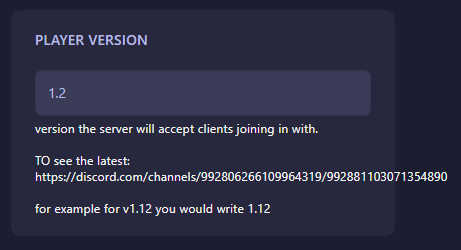
Locate the box labeled Player Version. You must enter the exact version number that you want the server to accept (e.g., if the current release is 1.12, enter 1.12). You can always find the latest required version number in the official RimWorld Together/Open World Discord channel. The GGServers panel features an automatic save function; your version update is recorded as soon as you finish typing.
Step 6: You are Ready to Start!
Return to the main dashboard and click Start. Your RimWorld Open World server will now boot up and only allow players using the matching client version to enter the world.
Experience seamless colony management with RimWorld server hosting at GGServers. Our instant setup and easy-to-use panel ensure your server is always running the right version for your community.