 Billing
& Support
Billing
& Support Multicraft
 Game
Panel
Game
Panel



How to Change the Max Player Count on Your Squad Server
Adjusting the maximum player capacity of your Squad server allows you to scale your community sessions, whether you are hosting a small tactical drill or a full-scale 100-player conflict. Balancing your player count is also important for server performance. Using the GGServers panel, you can update this limit in just a few clicks. Follow the steps below to modify your server’s player slots.
Step 1: Access the GGServers Panel and Stop Your Server
Log in to the GGServers Control Panel. Before adjusting slot limits, you must Stop your server. This ensures the change is correctly applied to the server’s configuration files before the game engine initializes.

Step 2: Navigate to Server Settings
On the left-hand navigation sidebar, click on the Server Settings button. This will open the various management tabs for your Squad server.

Step 3: Open the General Settings Tab
Within the settings menu, click on the General Settings tab. This area contains the primary configuration fields for your server’s operation.

Step 4: Update Max Players
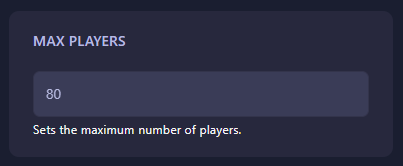
Locate the box labeled Max players. Enter the total number of player slots you wish to have available on your server. The GGServers panel features an auto-save system, so your new limit is saved automatically as soon as you finish editing the field.
Step 5: Start Your Server
Once the value is updated, return to the main dashboard and click Start. Your Squad server will now boot up with the new player capacity active.
If you have questions about slot limits or server performance, please contact our team at GGServers Support.