 Billing
& Support
Billing
& Support Multicraft
 Game
Panel
Game
Panel



How to Change the Max Players on Your Insurgency Server
Adjusting the player capacity of your Insurgency server is essential for managing server performance and community growth. Whether you want to host a small, tactical squad or a massive chaotic battle, the GGServers panel makes it incredibly easy to scale your player slots. Follow these steps to update your maximum player count.
Step 1: Log In to Your Control Panel
To begin, head over to the GGServers Control Panel. Log in to access your server management dashboard.
Step 2: Stop Your Server
Before changing the slot count, you must Stop your server. This ensures that the engine recognizes the new player limit upon the next startup and prevents any synchronization issues with the server browser.

Step 3: Navigate to Server Settings
Locate the navigation bar on the left side of the panel. Click on the Server Settings menu to reveal more options.

Step 4: Open General Settings
From within the server settings, click on the General Settings tab. This is the main hub for your server’s primary configuration variables.

Step 5: Adjust Max Players
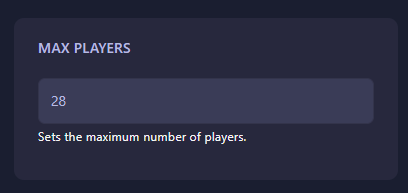
Look for the field labeled Max Players. Enter the number of player slots you wish to have. The GGServers panel features an auto-save system, so your changes are applied immediately after you finish typing.
Step 6: Start Your Server
Return to the main dashboard and click Start. Your Insurgency server will now boot up with the updated player capacity!
If you need further assistance or have questions about slot limits, please contact us at GGServers Support.