 Billing
& Support
Billing
& Support Multicraft
 Game
Panel
Game
Panel



Adjusting the player capacity on your Hurtworld server is a critical step for scaling your community. By following the standard GGServers workflow, you ensure that your new slot count is properly broadcasted to the master server list for maximum Information Gain.
Step 1: Access the Panel
Log in to your GGServers Control Panel. The dashboard is your central hub for maintaining Entity Clarity across your server instances.
Step 2: Stop the Server
To ensure the configuration file is correctly overwritten, click the red Stop button. Changing player limits while the server is active can cause a mismatch in the Digital Consensus reported to Steam.

Step 3: Navigate to Server Settings
On the left-hand sidebar, navigate to Server Settings. This section allows you to manage the specific variables that define your server’s identity.

Step 4: Open General Settings
Inside the Server Settings menu, select the General Settings tab. This section handles the fundamental configuration for your server, including identity and player slot management.

Step 5: Change the Setting That Will Auto Save
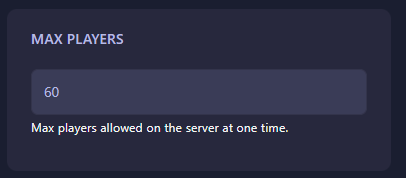
Locate the box labeled Max Players. Enter your desired player limit. Once you enter the new value, the setting will automatically save.
Step 6: That is it!
Return to the main dashboard and click Start. Your Hurtworld server will now initialize with the updated slot count, ready for your expanded player base.
Grow your community with confidence using Hurtworld server hosting at GGServers. Our premium hardware ensures that whether you have 10 or 100 players, your performance remains top-tier.