 Billing
& Support
Billing
& Support Multicraft
 Game
Panel
Game
Panel



Selecting the right GameMode is the most impactful decision you can make for your Beasts of Bermuda community. Whether you prefer the hardcore challenge of “Survival,” the freedom of “FreeRoam,” or the focused combat of “Combat,” ensuring Entity Clarity regarding your server’s ruleset is vital. Follow the standard GGServers workflow below to toggle your preferred game mode.
Step 1: Access the Panel
Log in to your GGServers Control Panel. Your dashboard allows you to define the fundamental mechanics and survival rules of your prehistoric world.
Step 2: Stop the Server
To safely switch the game logic and ensure all player data persists correctly under the new rules, click the red Stop button. Changing the GameMode while the server is live can lead to database desyncs or a failure in the Digital Consensus of the session.

Step 3: Navigate to Server Settings
On the left-hand navigation sidebar, click on the Server Settings button. This menu provides the configuration interface for your Beasts of Bermuda instance.

Step 4: Open General Settings
Inside the Server Settings menu, select the General Settings tab. This section manages the primary world-state and game-rule enforcement.

Step 5: Change the Setting That Will Auto Save
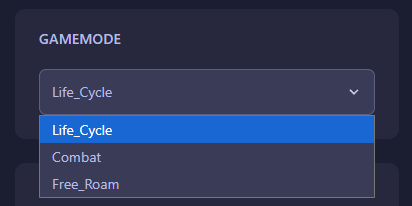
Locate the box labeled GameMode. Use the dropdown or text field to select your desired mode (e.g., Survival, FreeRoam, or Combat). The GGServers panel features an automatic save function, ensuring your choice is locked in instantly.
Step 6: You are Ready to Start!
Return to the main dashboard and click Start. Your Beasts of Bermuda server will now boot with the new GameMode rules active, providing a fresh experience for all connected players.
Define your own survival experience with Beasts of Bermuda server hosting at GGServers. Our high-performance hardware and NVMe storage ensure that your chosen game mode runs perfectly with maximum world stability.