 Billing
& Support
Billing
& Support Multicraft
 Game
Panel
Game
Panel



How to Change the Number of AutoSaves to Keep on Your OpenRCT2 Server
Managing your server’s storage and backup history is a vital part of park administration. The Autosaves To Keep setting determines how many historical restore points your server maintains before it begins overwriting the oldest files. By increasing this number, you create a longer history of backups to revert to if a mistake is made or a park is vandalized. Follow the steps below to configure your rotation limit on the GGServers panel.
Step 1: Access the Panel
Log in to your GGServers Control Panel and select your OpenRCT2 server. This dashboard allows you to manage your file retention and automated backup rotations.
Step 2: Stop Your Server
To ensure that the new rotation limit is correctly applied to the server’s configuration files, you must first stop the server. Click the red Stop button on the main console. Wait for the status indicator to confirm the server is “Offline” before proceeding.

Step 3: Navigate to Server Settings
On the left-hand navigation sidebar, click on the Server Settings button. This menu provides access to the core configuration fields for your OpenRCT2 instance.

Step 4: Open General Settings
Within the settings menu, select the General Settings tab. This section contains the primary automation and file management toggles for your theme park.

Step 5: Change the “Autosaves To Keep” Setting
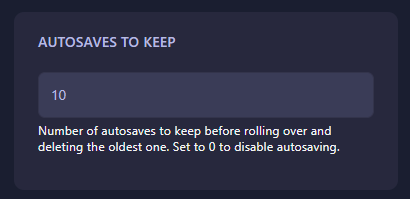
Locate the box labeled Autosaves To Keep. Enter the number of backup files you wish to retain. Once this limit is reached, the server will delete the oldest autosave to make room for the newest one. Note that setting this value to 0 will disable the autosaving feature entirely. The GGServers panel will automatically save your changes once you update the value in the box.
Step 6: That is it!
You have successfully configured your backup rotation! Return to the main console and click Start. Your OpenRCT2 server will now begin managing its autosave history according to your new limit.
Build with confidence knowing your history is protected with OpenRCT2 server hosting at GGServers. Our flexible panel makes it easy to keep as many backups as you need!