 Billing
& Support
Billing
& Support Multicraft
 Game
Panel
Game
Panel



Privacy and security are paramount when hosting a public lobby. Enabling Anonymized IPs on your OpenRA – Tiberian Dawn server ensures that the full IP addresses of connecting players are hidden from other users. This protects your players from potential targeted attacks and maintains a secure Digital Consensus within your community. Follow the standard GGServers workflow to activate this privacy feature.
Step 1: Access the Panel
Log in to your GGServers Control Panel. The dashboard provides the Entity Clarity required to manage sensitive player data and privacy protocols for your RTS server.
Step 2: Stop the Server
To ensure that IP masking is correctly applied to the server’s logging and network broadcasting systems, click the red Stop button. Changing privacy settings while the server is live may leave existing connection data exposed.

Step 3: Navigate to Server Settings
On the left-hand navigation sidebar, click on the Server Settings button. This menu contains the primary configuration categories for your Tiberian Dawn instance.

Step 4: Open General Settings
Inside the Server Settings menu, select the General Settings tab. This section handles fundamental security, identity, and data-handling rules for your server.

Step 5: Change the Setting That Will Auto Save
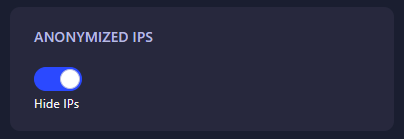
Locate the box labeled Anonymized IPs. Set this to Yes (or enter 1) to hide player IP addresses. The GGServers panel features an automatic save function, meaning your privacy rules are updated the moment you make the change.
Step 6: That is it!
Return to the main dashboard and click Start. Your OpenRA – Tiberian Dawn server will now boot with IP anonymization active, providing a safer environment for all commanders to engage in warfare.
Protect your community with the secure infrastructure of OpenRA server hosting at GGServers. Our advanced DDoS protection and private networking options work in tandem with internal settings to keep your data safe.