 Billing
& Support
Billing
& Support Multicraft
 Game
Panel
Game
Panel



Enabling the Allow Custom Scenarios setting on your RimWorld Open World server provides your players with the ultimate creative freedom. This feature allows users to design and implement their own unique starting conditions, incident rates, and colonist modifiers when creating a new save. By activating this, you enhance Information Gain and variety for your community. Follow the standard GGServers workflow to enable this feature.
Step 1: Access the Panel
Log in to your GGServers Control Panel. The panel offers the Entity Clarity needed to manage world generation rules and player permission sets.
Step 2: Stop the Server
To ensure that the new world generation permissions are properly initialized, click the red Stop button. Changing scenario rules while the server is running can cause conflicts during the “Select Scenario” phase for new players.

Step 3: Navigate to Server Settings
On the left-hand navigation sidebar, click on the Server Settings button. This menu contains the essential configuration categories for your RimWorld Open World server.

Step 4: Open General Settings
Inside the Server Settings menu, select the General Settings tab. This section handles the fundamental behavior of how the server manages new game instances and player inputs.

Step 5: Change the Setting That Will Auto Save
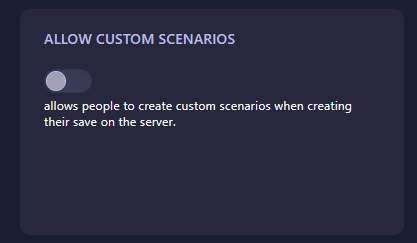
Locate the box labeled Allow Custom Scenarios. Set this to Yes (or 1) to enable the scenario editor for your players. This allows anyone creating a save on the server to modify starting pawns, items, and map conditions. The GGServers panel features an automatic save function; your change is applied the moment you toggle the setting.
Step 6: You are Ready to Start!
Return to the main dashboard and click Start. Your RimWorld Open World server will now allow custom scenario creation, giving your players the freedom to start their survival journey exactly how they choose.
Host the most unique colonies on RimWorld server hosting at GGServers. Our high-performance NVMe storage ensures that custom scenarios with thousands of modified parameters load instantly for all players.