 Billing
& Support
Billing
& Support Multicraft
 Game
Panel
Game
Panel



How to Enable Public Advertising for Your Squad Server
If you want your Squad server to be discoverable by the wider community, you must ensure that it is “advertising” to the master server list. When this setting is enabled, your server reports its status, player count, and name to the public directory, allowing players to find you through the in-game browser. Follow this guide to toggle public advertising using the GGServers panel.
Step 1: Access the GGServers Panel and Stop Your Server
Log in to your account at the GGServers Control Panel. Before changing how your server communicates with the public list, you must Stop the server. This ensures that the new networking parameters are correctly broadcast when the server restarts.

Step 2: Navigate to Server Settings
Locate the navigation menu on the left side of the dashboard. Click on Server Settings to open the configuration sub-menus.

Step 3: Open General Settings
Click on the General Settings tab. This section contains the core visibility and identity toggles for your Squad server.

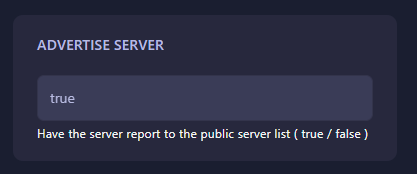
Step 4: Toggle Advertise Server
Find the box labeled Advertise server. When this switch is turned on, your server will report to the public server list. If you wish to keep your server private for testing or events, you can turn this off. The GGServers panel features an auto-save system, so your preference is saved immediately.
Step 5: Start Your Server
Once you have configured the advertising setting, return to the main dashboard and click Start. Your server will now begin broadcasting to the Squad master server list!
If your server still doesn’t appear in the browser after enabling this, please contact our support team at GGServers Support.