 Billing
& Support
Billing
& Support Multicraft
 Game
Panel
Game
Panel



How to Auto Setup Ports for Plugins and Mods on Startup
Our system is designed to make things easier for you by automatically handling the setup of some of the most popular Minecraft plugins and mods. With these, you don’t need to worry about long configuration steps; just install, restart, and you’re ready to go.
Currently, the following plugins and mods have auto setup support:
- Dynmap – Live web-based map of your world.
- BlueMap – 3D map rendering directly in your browser.
- Votifier – Let players vote for your server on listing sites and reward them.
- VoiceChat (Simple Voice Chat) – Adds in-game voice chat support.
- LuckPerms (with Geyser/Floodgate setups) – Powerful permissions plugin, auto-configured when running with Geyser.
How It Works
- Install the plugin or mod by uploading it into your
plugins(for Bukkit/Spigot/Paper) ormods(for Forge/Fabric/Quilt) folder. - Restart the server once so that the system generates a unique port and the initial configuration files.
- Restart the server again to allow the auto setup process to apply the correct configuration with the assigned port.
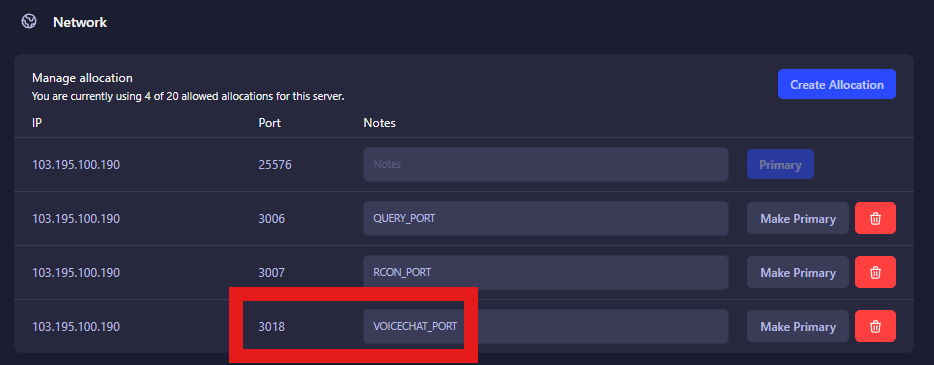
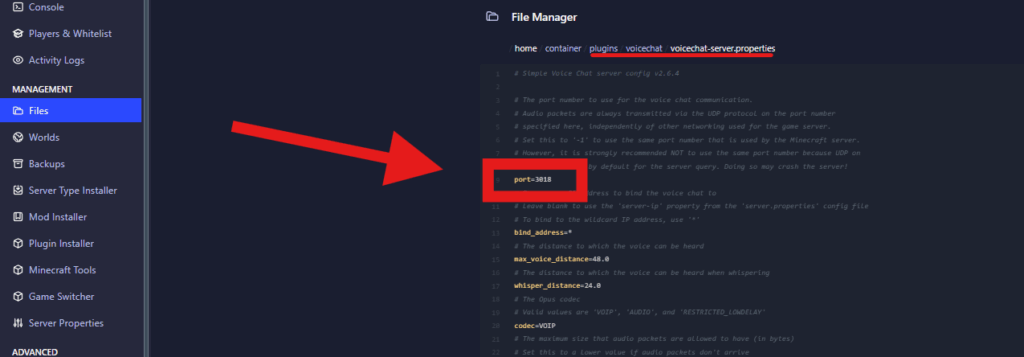
After this, everything will be pre-configured and ready to use. You can then customize additional settings in the plugin or mod’s config file if needed.
This setup flow removes the usual trial-and-error of port configuration and ensures that everything works right after installation. Whether you’re looking to set up maps, permissions, voting, or voice chat, you can rely on these supported plugins and mods to be automatically ready with minimal effort.